OpenAI's GPTBot robots.txt guidance describes two separate crawlers: GPTBot for training models and OAI-SearchBot for ChatGPT search, with each controlled by its own User-agent group. Blocking GPTBot alone does not block OAI-SearchBot, allowing a site to remain in ChatGPT search while declining training. Server logs can confirm whether both crawlers follow the directives. Robots.txt is still a request rather than access control, so sensitive content requires authentication.
What are GPTBot and OAI-SearchBot, and how do their purposes differ?
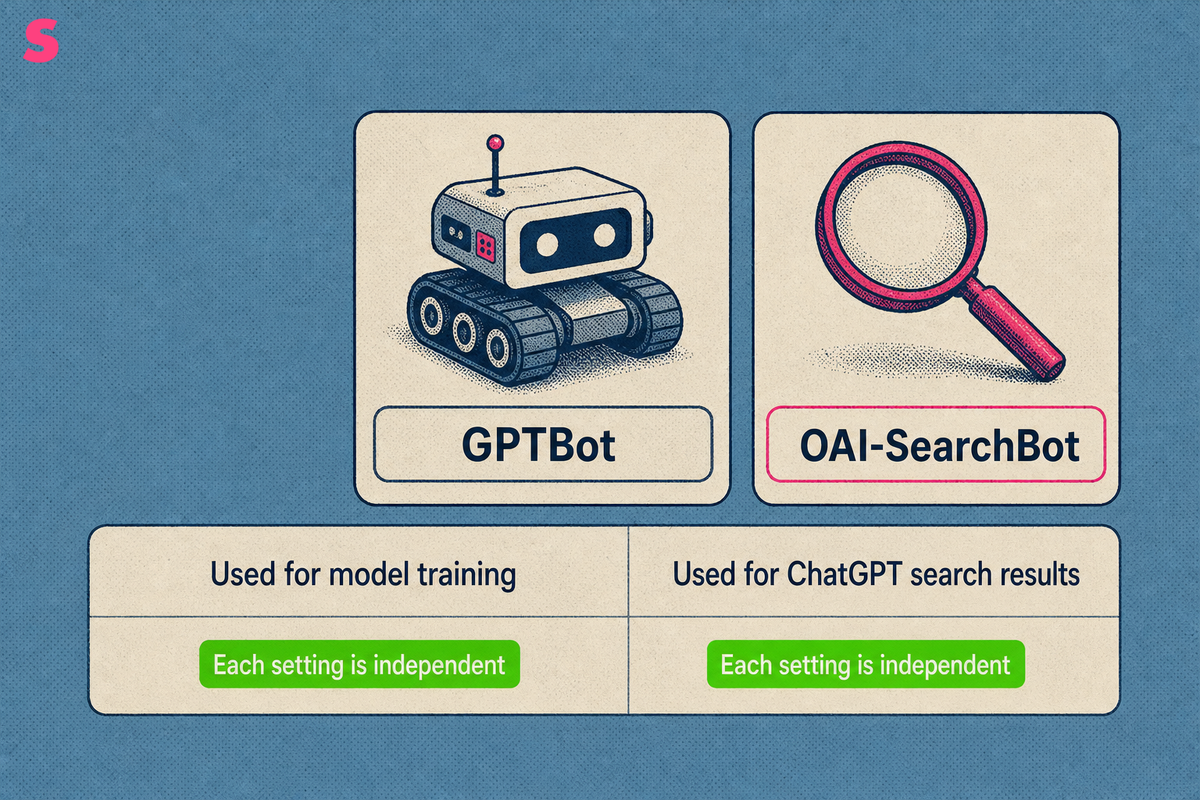
GPTBot and OAI-SearchBot are separate OpenAI web crawlers with different purposes. GPTBot is associated with AI model training, while OAI-SearchBot is associated with ChatGPT search results, per platform.openai.com, October 10, 2026.
Robots.txt can govern each crawler independently. A content team can allow OAI-SearchBot to access public documentation, comparison pages, and help content for ChatGPT search while disallowing GPTBot from training use. OpenAI documents separate crawler controls with independent robots.txt settings, per platform.openai.com, October 10, 2026.
OpenAI states: “Each setting is independent of the others – for example, a webmaster can allow OAI-SearchBot in order to appear in search results while disallowing GPTBot to indicate that crawled content should not be used for training OpenAI’s generative AI foundation models.” OpenAI, platform.openai.com, October 10, 2026.
A GPTBot rule applies only to GPTBot, and an OAI-SearchBot rule applies only to OAI-SearchBot. ChatGPT, Perplexity, Gemini, Claude, and other answer engines use their own crawler identities and documentation.
How do you allow GPTBot in robots.txt?
To allow GPTBot explicitly, publish a robots.txt group for the GPTBot user-agent with Allow: /. Omitting an applicable Disallow rule also leaves crawling allowed by default. The openai gptbot robots.txt documentation identifies GPTBot as the user-agent for controlling training-related crawling, per platform.openai.com, October 10, 2026.
A sitewide policy uses two lines: User-agent: GPTBot, followed by Allow: /. This permits GPTBot to request public paths under the domain.
A selective policy can allow public documentation while excluding another path. For example, a SaaS company could use a GPTBot group with Allow: /docs/ and Disallow: /customers/. The policy applies only to publicly reachable content.
- Use User-agent: GPTBot to target the training crawler.
- Use Allow: / to permit access across the public site.
- Use a path-level Disallow directive when specific public paths need different treatment.
- Keep private material behind authentication rather than relying on crawler directives.
Robots.txt is a crawler policy, not a security boundary. URLs containing sensitive customer data, internal roadmaps, or account information should require authentication whether GPTBot is allowed or blocked.
How can you allow OAI-SearchBot while blocking GPTBot?
To allow OAI-SearchBot while blocking GPTBot, create separate robots.txt groups. Allow OAI-SearchBot to access public pages, then add a GPTBot group with Disallow: /. OpenAI documents these crawler settings as independent, per platform.openai.com, October 10, 2026.
Use one group for each user-agent. The OAI-SearchBot group contains Allow: /, and the GPTBot group contains Disallow: /. OpenAI’s documented OAI-SearchBot example includes version 1.4, per platform.openai.com, October 10, 2026, but the user-agent group should follow the crawler name in the current documentation.
| Content class and business goal | GPTBot policy | OAI-SearchBot policy | Authentication or WAF enforcement | Intended visibility outcome |
|---|---|---|---|---|
| Public marketing or documentation content | Disallow: / | Allow: / | Public access, with WAF rules that permit verified crawler requests | Eligible for ChatGPT search crawling without permitting training crawling |
| Search-visible but training-restricted content | Disallow: / | Allow: / | Public access, with origin and WAF rules aligned to the policy | Search-oriented access while signaling a training restriction |
| Authenticated customer or proprietary content | Disallow: / | Disallow: / | Authentication required, with WAF enforcement where needed | No public crawler access |
| Fully public content approved for both crawlers | Allow: / | Allow: / | Public access, with WAF rules that permit verified crawler requests | Eligible for both training-related and search-oriented crawling |
This split suits B2B SaaS sites that want public product information discoverable in ChatGPT search while maintaining a stricter policy for model-training crawls. It does not guarantee a citation. It sets crawler-access policy.
Does blocking GPTBot remove your site from ChatGPT search?
Blocking GPTBot does not necessarily remove a site from ChatGPT search. GPTBot governs training-related crawling, while OAI-SearchBot is associated with ChatGPT search results, per platform.openai.com, October 10, 2026.
A site that blocks GPTBot and allows OAI-SearchBot is making a specific policy decision: do not use the site for generative AI foundation-model training, but permit search-oriented crawling. A GPTBot Disallow directive signals that content should not be used to train generative AI foundation models, per platform.openai.com, October 10, 2026.
Training inclusion and search retrieval are separate crawler controls. Blocking GPTBot can prevent its training crawl while OAI-SearchBot remains eligible to request pages for search.
Sona AI Visibility connects AI citations and AI-referred visits to pipeline and revenue, helping marketing teams evaluate whether answer-engine visibility produces commercial outcomes rather than only mention counts. That measurement begins after crawler access is configured correctly.
How do you check your current robots.txt configuration for mistakes?
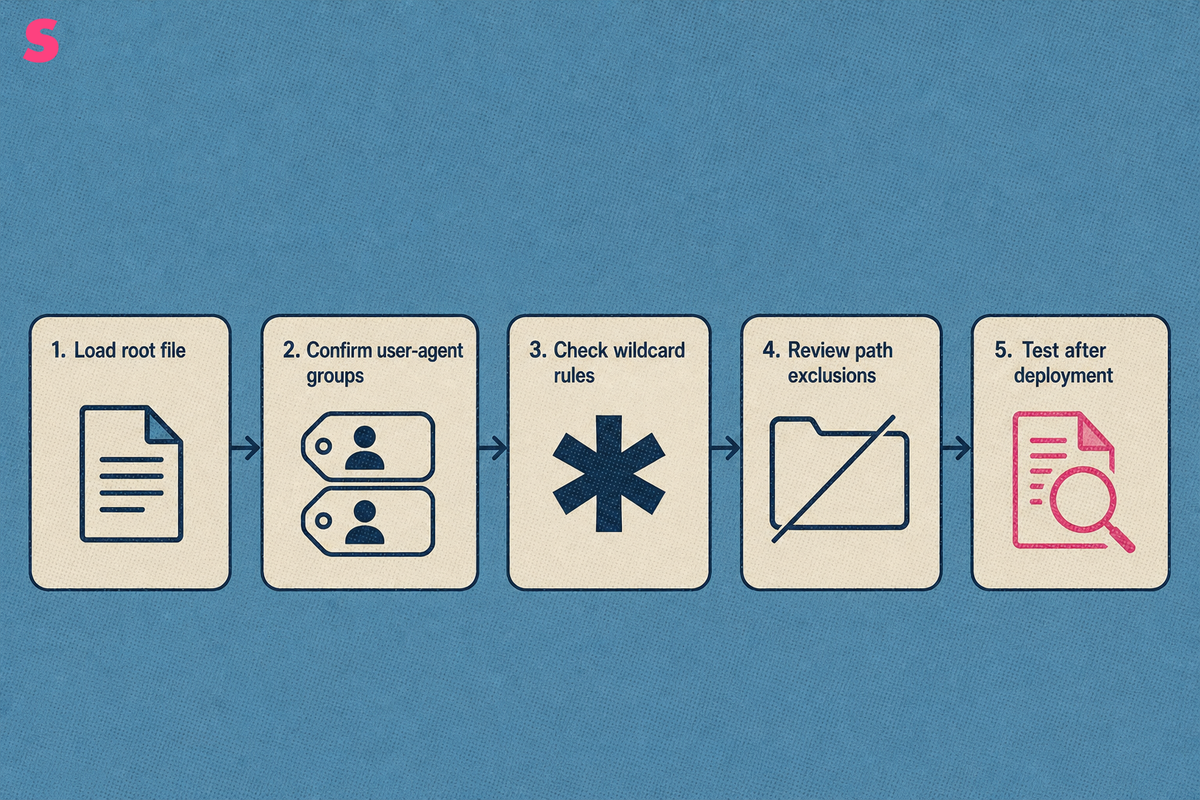
Check robots.txt by loading the root-level file, confirming the correct user-agent groups, and testing whether GPTBot and OAI-SearchBot receive the intended Allow or Disallow policy. The file must be publicly accessible at the domain root and encoded in UTF-8.
- Request the root-level robots.txt file for the exact domain and protocol your site uses.
- Confirm that User-agent: GPTBot and User-agent: OAI-SearchBot appear in separate groups when policies differ.
- Check for broad directives such as User-agent: * that can affect every crawler.
- Review path syntax for unintended exclusions, especially staging, documentation, blog, and resource directories.
- Test the file after deployment and inspect server logs after the crawler returns.
A robots.txt file in a subdirectory is not the site policy. A file at /docs/robots.txt does not govern the root domain. Encoding errors, malformed directives, and deployment rules that return an HTML error page can undermine an otherwise correct policy.
A visibility score shows that a page is absent from answers. A technical audit identifies the cause. Sona AI Visibility’s technical audit scores each page out of 100 across crawlability, performance, security, content structure, content quality, and accessibility; it ranks findings as critical or medium with the fix attached, then re-runs on a watch so teams can confirm whether the fix landed.
Why is robots.txt alone not enough, and how do WAF rules interact with it?
Robots.txt communicates crawler preferences, but it does not guarantee that a public page can be fetched. A web application firewall, CDN rule, rate limit, authentication layer, or JavaScript dependency can prevent GPTBot or OAI-SearchBot from accessing content.
Robots.txt answers, “Should this crawler request the path?” A WAF answers, “Can this request reach the origin?” These are separate controls. A crawler permitted in robots.txt can still receive a 403 response from a firewall rule.
- Use robots.txt to express crawler-specific access policy.
- Use authentication for proprietary or customer-specific material.
- Review WAF events for blocked requests from verified crawlers.
- Check whether server-rendered HTML is available without a browser-dependent JavaScript execution path.
Test WAF behavior by reviewing verified crawler requests through the CDN, WAF, and origin logs. Confirm whether a denial occurred at the edge or whether the request reached the origin and received an application response. Retrieval crawlers affect whether a page can support a live answer, while training crawlers affect later model knowledge.
AI crawler accessibility depends on the full delivery chain. The WAF, CDN, origin response, and page rendering path must support the same access decision expressed in robots.txt.
How can you verify in your server logs that GPTBot obeys your robots.txt rules?
Verify GPTBot behavior with a post-deployment audit that authenticates requests against OpenAI’s current crawler-verification data, rather than trusting a GPTBot User-Agent string alone. OpenAI publishes GPTBot user-agent information for webmasters, per platform.openai.com, October 10, 2026.
- Record the deployment time and preserve the active robots.txt file used after that time.
- Confirm a successful robots.txt fetch by a verified GPTBot request, then analyze only requests after that fetch.
- Match each candidate request against OpenAI’s current official crawler-verification data and exclude requests that only claim the GPTBot User-Agent.
- Classify each verified request path against the active GPTBot Allow and Disallow rules.
- Separate origin responses from CDN or WAF denials, including 403 responses generated before the request reached the application.
- Pass the audit only when verified GPTBot requests after the policy took effect appear on allowed paths and do not appear on disallowed paths.
A representative query pattern is: timestamp >= policy_deployment AND verified_openai_gptbot = true, grouped by path, response code, edge action, and origin status. Run a separate query for the robots.txt path to confirm the crawler received the current policy.
| Observed request | Interpretation | Audit result |
|---|---|---|
| Verified GPTBot request to /docs/ after a successful robots.txt fetch | The request matches an allowed path | Pass |
| Verified GPTBot request to /customers/ after a Disallow: /customers/ policy took effect | The request reached a disallowed path | Investigate |
| Request with a GPTBot User-Agent that fails OpenAI verification | The User-Agent was spoofed or cannot be authenticated | Exclude from GPTBot compliance results |
OpenAI documents GPTBot as honoring robots.txt directives that exclude content from training use, per platform.openai.com, October 10, 2026. Your own verified logs provide the relevant validation because they show requests to your domain, paths, and infrastructure.
Sona AI Visibility reads AI crawler activity from server logs or a lightweight edge worker, without a JavaScript tag, and shows which AI bots reach pages and how often. This matters when ad blockers or browser-based analytics cannot observe crawler traffic.
Prompt monitoring requires a different cadence. A team that runs the same prompt list daily can identify shifts that a weekly snapshot averages away, because answers change with retrieval indexes, model updates, and newly published competitor content. Review crawler access and technical conditions periodically while prompt tracking runs daily.
Do GPTBot and OAI-SearchBot request Markdown through the Accept header?
Observed crawl data does not show GPTBot or OAI-SearchBot requesting Markdown through the Accept: text/markdown header. Both crawlers have requested linked .md files, but the evidence supports direct file requests rather than content negotiation.
Dries Buytaert recorded 5,722 OAI-SearchBot requests, including 1,300 .md-file requests and 4,422 HTML requests, per dri.es, October 2, 2026. The .md requests represented 22.7% of observed OAI-SearchBot requests in that dataset, per dri.es, October 2, 2026.
| Buytaert dataset, October 2, 2026 | HTML requests observed | Linked .md requests observed | Accept: text/markdown observed |
|---|---|---|---|
| OAI-SearchBot | 4,422 | 1,300 | None observed across the dataset |
| GPTBot | Not published | 1,177 | None observed across the dataset |
Separate two-week October 2026 log analysis recorded about 80,000 AI-crawler requests to Markdown pages. In that analysis, GPTBot requested HTML pages and linked .md pages, with no Accept: text/markdown requests.
Buytaert reported zero observed AI crawlers using content negotiation via Accept: text/markdown, per dri.es, October 2, 2026.
Should SaaS companies publish .md pages, and what else makes content readable to AI crawlers?
SaaS companies do not need to publish a Markdown version of every page. Linked .md pages are an optional publishing format, while crawlable HTML, clear information architecture, accessible public content, and correct robots.txt rules remain the core requirements for AI crawler accessibility.
Markdown can help with documentation, technical references, API guides, changelogs, and product specifications. OpenAI crawlers request linked .md files, including 1,177 GPTBot .md requests in Buytaert’s dataset, per dri.es, October 2, 2026. That evidence does not establish that every HTML page needs a Markdown mirror.
- Keep the HTML page as the maintained source when it is already crawlable and well structured.
- Use canonical tags when HTML and Markdown versions contain substantially similar content.
- Automate synchronization so the Markdown version does not become stale.
- Expose important product facts in server-rendered HTML, headings, tables, and concise explanatory copy.
- Test robots.txt, WAF rules, and origin responses before adding another format.
Sona AI Visibility helps teams connect AI citations and crawler activity to pipeline and revenue, while its page-level audit identifies technical fixes attached to the pages that need work. The goal is to make each page available for crawlers to fetch, parse, and evaluate.
A Markdown mirror is a publishing decision, not a substitute for technical hygiene. Start with public access, valid robots.txt directives, stable HTML, and accurate content. Add .md pages where they improve documentation consumption and where the organization can maintain them reliably.
What are the frequently asked questions?
Does GPTBot respect robots.txt?
OpenAI documents GPTBot as honoring robots.txt directives, per platform.openai.com, October 10, 2026. A Disallow directive for GPTBot signals that content should not be used to train generative AI foundation models, per platform.openai.com, October 10, 2026. Server logs confirm crawler behavior for a site’s own domain, paths, and infrastructure.
Where does the robots.txt file have to live?
The robots.txt file must live at the root of the domain, be publicly accessible, and use UTF-8 encoding. A file in a subdirectory is not read as the policy for the full site. Check the exact production host rather than assuming a staging configuration applies.
Does allowing GPTBot give away proprietary content?
GPTBot is associated with content that can be used for model training. Teams with strict data-control policies can disallow GPTBot while allowing OAI-SearchBot for ChatGPT search. Sensitive material should remain behind authentication because robots.txt is not an access-control system.
Is robots.txt a security control?
No. Robots.txt states crawler preferences and does not technically prevent a client from requesting a URL. Use authentication for protected material, then use WAF rules where infrastructure-level request controls are needed.
Do the same rules apply to other AI crawlers?
No. Each crawler reads its own User-agent group. A rule written for GPTBot does not govern crawlers from other vendors. Each crawler needs its own entry, checked against current vendor documentation and validated in server logs.
Do I need to publish a Markdown version of every page?
No. Buytaert observed zero AI crawlers using Accept: text/markdown, per dri.es, October 2, 2026. A Markdown mirror needs canonicalization and automated synchronization with the HTML source. Treat Markdown as optional, then test whether it supports the content types your team publishes.
Summarize this article with AI: ChatGPT · Claude · Perplexity · Google AI Mode
Last updated: October 2026