A UTM is a brief tag placed at the end of a URL that shows analytics platforms which campaign, channel or ad brought in each visitor. Five standard parameters hold these labels: source, medium, campaign, term and content. They remain valuable only if a team uses a shared lowercase naming convention and avoids tagging internal links. UTMs also miss dark traffic and many AI-search visits, so use them as labels rather than complete attribution. Sona Marketing Measurement connects every channel, AI search included, to accounts, pipeline and revenue when UTM labels alone leave gaps.
What is a UTM and what does UTM mean in marketing?
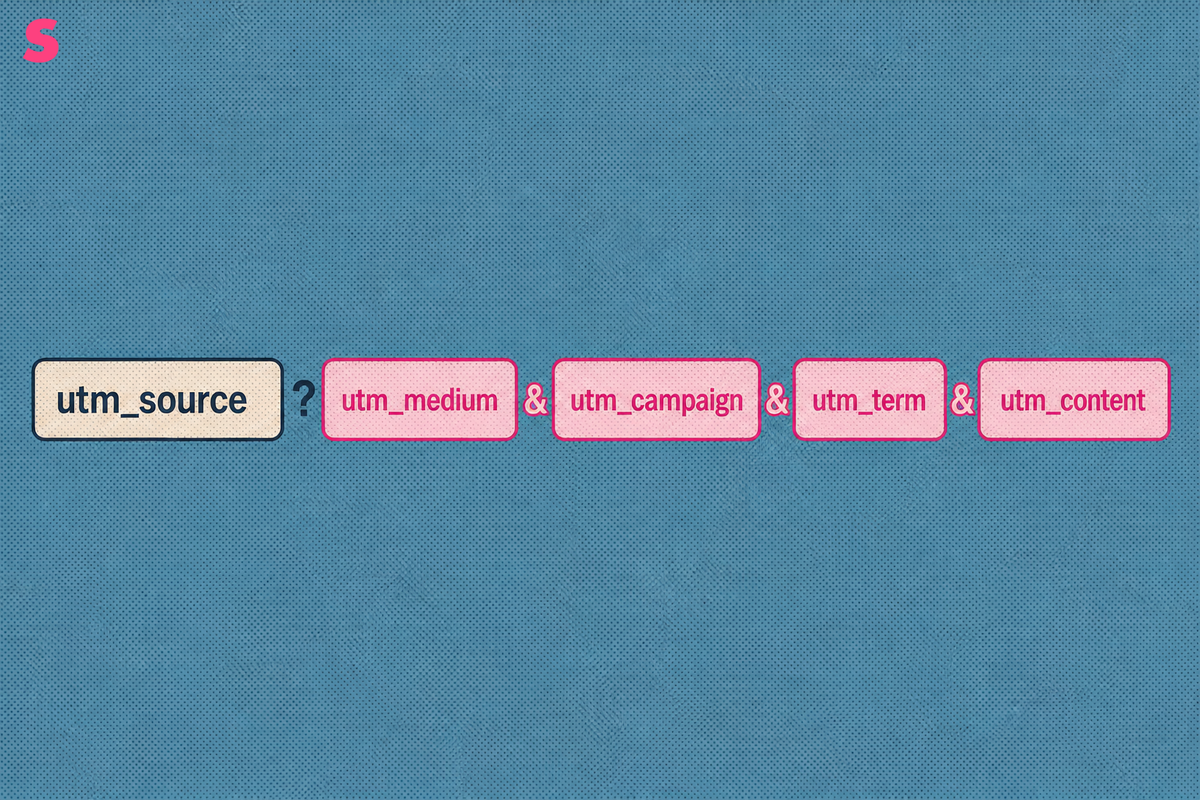
A UTM is a set of labels added to a link, and UTM means Urchin Tracking Module in marketing. The labels help marketers identify the campaign that brought a visitor to a website.
UTM parameters sit after the destination page address in a URL query string. They send campaign details to analytics tools, including Google Analytics, without changing the page a visitor sees. A tagged link records the source, channel, and campaign behind a click.
For example, a marketer can tag a newsletter link so reports separate email traffic from paid social, partner referrals, and organic search. UTMs are useful when several campaigns send visitors to the same landing page.
UTM tracking answers a narrow question: which tagged link produced this session? It does not prove that one click caused a deal. That distinction matters when a B2B buying journey includes ads, content, sales conversations, and several stakeholders.
What is a UTM link and how does UTM tracking work from click to report?
A UTM link is a regular destination URL with campaign parameters added, and UTM tracking passes those parameters from a click into analytics reports. The page destination stays the same.
When a visitor clicks a tagged link, the browser loads the landing page with the parameters attached. Analytics software reads the values and stores them with the session. Reports can group visits, conversions, and other events by source, medium, campaign, or creative.
- A marketer creates a campaign link. The link includes approved parameter values for its source, medium, and campaign.
- A visitor clicks the campaign link. The parameters travel with the landing-page request.
- Analytics records the session. The reporting system assigns the visit to the supplied campaign labels.
- The visitor completes an event. A form submission, demo request, or purchase can be reviewed against the recorded campaign data.
A working report shows one consistent source, medium, and campaign for traffic from that placement. If a campaign appears under several spellings, the tagging taxonomy caused the problem.
UTM marketing works best when tags describe distribution activity. A UTM link identifies the email, paid placement, or partner link used. It does not replace CRM opportunity data, account identity, or multi-touch attribution.
What do the five UTM parameters mean, and what goes in each one?
The five UTM parameters describe where a campaign link appeared, how it was distributed, and which variation a visitor clicked. Source, medium, and campaign are the recommended baseline for consistently reported external campaign links.
Technical requirements vary by analytics setup, link builder, and team governance rules. Term and content add detail when reporting needs keyword, audience, placement, or creative context.
| Parameter | Question answered | What goes in it | Example value |
|---|---|---|---|
| utm_source | Which specific origin sent the click? | Platform, publisher, partner, or newsletter name | |
| utm_medium | What channel type was used? | Distribution method | paid-social |
| utm_campaign | Which marketing initiative was this? | Shared campaign name | spring-demo |
| utm_term | Which keyword or targeting term applied? | Paid search keyword or audience detail | marketing-attribution |
| utm_content | Which creative or link variant was clicked? | Ad, button, image, or copy variation | carousel-a |
Use utm_term when a paid search program needs keyword-level context. Use utm_content when two links share a campaign but differ by creative, placement, or call to action. Both fields add detail, but neither replaces a clear campaign name.
UTM parameters are labels, not performance results. A campaign tag tells the reporting system which link was clicked. Revenue analysis still requires a reliable connection between web activity, contacts, accounts, and closed opportunities.
How do you set up UTM tracking for a campaign, step by step?
To set up UTM tracking for a campaign, define the reporting goal and naming rules before building links. You need access to the analytics property and a shared campaign taxonomy.
A complete UTM URL can look like this: https://example.com/demo?utm_source=linkedin&utm_medium=paid-social&utm_campaign=spring-demo. The ? starts the query string, & separates parameters, and = connects each parameter name to its value.
- Choose the conversion to evaluate. Select the event that matters, such as a form submission, demo request, trial start, or qualified opportunity.
- List every external placement. Include paid ads, partner emails, social posts, webinars, newsletters, and affiliate links.
- Assign source, medium, and campaign values. Use the same values for every asset in the same reporting structure.
- Add term and content when needed. Use them for paid keywords, audience segments, creative variants, or separate calls to action.
- Build and test each link. Open the tagged link, confirm the correct landing page loads, then check that analytics receives the campaign values.
- Publish from a controlled link list. Give teams copied links rather than asking each person to create tags independently.
If the destination already has a query string, add UTM parameters with &, not another ?. Use dashes instead of spaces where possible. Encode unavoidable spaces and special characters, and place any URL fragment after the full query string.
A working setup produces one campaign record with clean values in analytics after a test visit. Test before launch because a duplicate parameter, malformed query string, or broken redirect can remove campaign detail.
If a campaign report is blank, inspect the final published URL. Then check redirects, URL shorteners, landing-page forms, and analytics filters. Fix the source link and relaunch it. Historical clicks with missing parameters cannot be reconstructed reliably.
How should a B2B team name UTM values so the convention survives growth?
A B2B team should name UTM values with a written taxonomy, lowercase formatting, and one documented delimiter. Consistent source, medium, and campaign names prevent one channel from splitting into several report rows.
Use lowercase values because analytics treats capitalization as a different value. For example, LinkedIn, linkedin, and LINKEDIN can become separate sources. Use dashes between words, such as paid-social or q3-product-launch, and reserve underscores for teams that have adopted them as a standard.
| Field | Naming rule | Good example | Problem avoided |
|---|---|---|---|
| Source | Name the specific origin | Platform names split across reports | |
| Medium | Name the channel type | paid-social | Paid and organic traffic mixed together |
| Campaign | Use one shared initiative name | q3-demo-push | Assets cannot roll up to one program |
| Content | Describe the variant | video-15s | Creative tests remain indistinguishable |
| Term | Record the keyword or audience detail | attribution-software | Paid-search context disappears |
Maintain one shared document with approved values, examples, owners, and change rules. That document prevents data fragmentation during analysis.
A practical convention separates durable fields from changing fields. The source remains linkedin, the medium remains paid-social, and the campaign changes for each initiative. That structure makes quarterly reports easier to filter and compare.
What breaks UTM tracking, and how do you fix it?
UTM tracking breaks when tags are inconsistent, removed during redirects, or used on internal links. Fix UTM tracking by checking the final landing URL, standardizing values, and preserving the original acquisition source.
| Failure | What the report shows | Cause | Recovery |
|---|---|---|---|
| Mixed capitalization | Several rows for one source | Different teams used different casing | Adopt lowercase values and merge reporting rules |
| Different medium names | Channel totals do not reconcile | Paid social uses several labels | Approve one medium per channel type |
| Malformed first parameter | Campaign values do not appear | https://example.com/demo&utm_source=linkedin uses & before a query string |
Use https://example.com/demo?utm_source=linkedin |
| Malformed existing query string | Some values are missing or ignored | https://example.com/demo?plan=pro?utm_campaign=spring-demo uses a second ? |
Use https://example.com/demo?plan=pro&utm_campaign=spring-demo |
| Broken redirect | Traffic appears unattributed | Redirect strips query parameters | Test the final URL and preserve parameters |
| Internal-link tagging | Original source is overwritten | Site navigation includes UTMs | Remove tags from internal links |
| Manual edits | Campaign names fragment | Published links were changed ad hoc | Use a controlled link register |
Internal UTM tags can overwrite acquisition data. A visitor may arrive through paid search, then click a tagged navigation button. Analytics can replace the original acquisition source with the internal label. Use event tracking for on-site clicks instead.
Recovery starts with a test click from the published placement. Compare the original tagged URL with the address after every redirect. Then inspect analytics for the exact source, medium, and campaign values. Correct future links, document the incident, and annotate the affected reporting period.
Where do UTM values show up in GA4, your CRM and your reports?
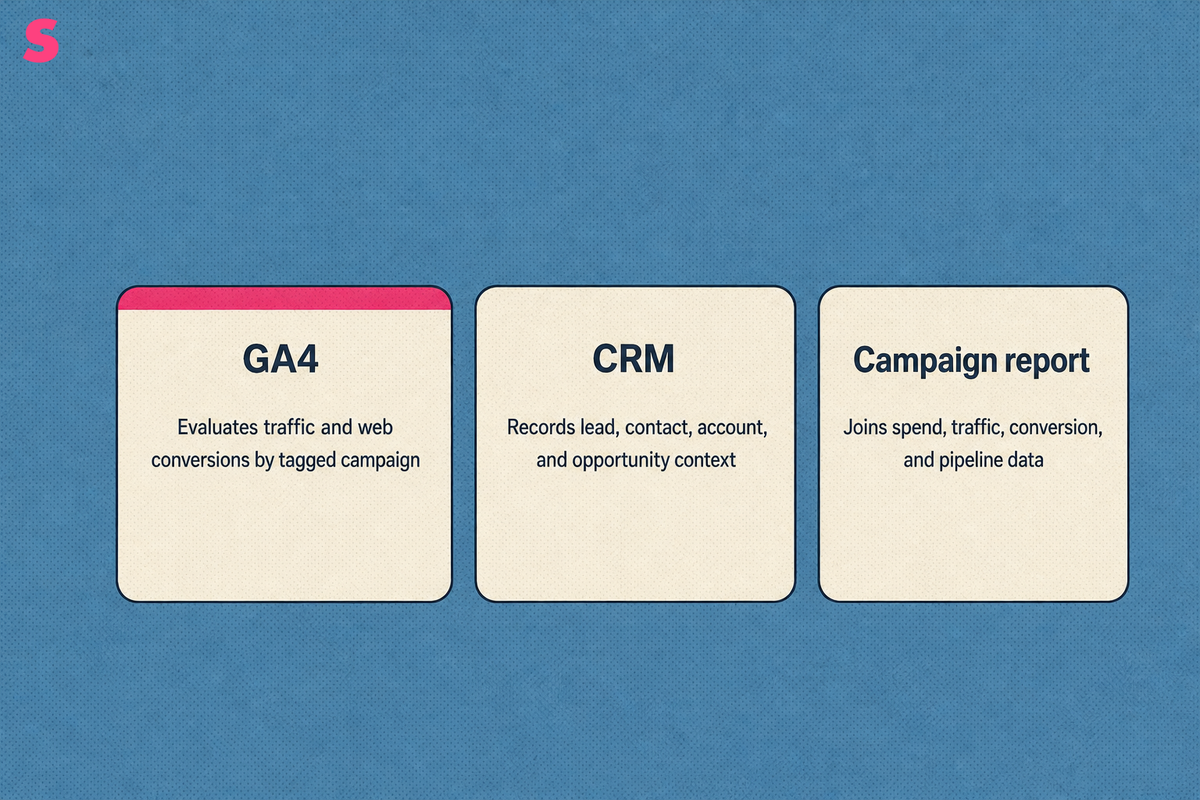
UTM values show up first in GA4 acquisition reports, then in CRM fields or attribution records when campaign data passes through forms and integrations. Each system uses the same labels for a different reporting purpose.
In GA4, open Reports, then Acquisition, then Traffic acquisition. Set the primary dimension to Session source / medium or Session campaign. Add a filter for the relevant Session campaign value to inspect traffic, engagement, and configured conversion events from one tagged initiative.
Traffic acquisition reports describe the session that brought the visitor to the site. For first-touch reporting, open Reports, then Acquisition, then User acquisition, and select First user source / medium or First user campaign. Confirm in Google's documentation how session and first-user acquisition differ before choosing one for a report.
Fragmented GA4 rows usually indicate inconsistent capitalization or naming. For example, linkedin and LinkedIn can appear separately. Confirm that the medium naming convention aligns with the channel grouping your team expects.
In a CRM, UTM values can be captured when a known visitor submits a form. The CRM record gives sales and marketing teams context about the acquisition touchpoint. A CRM campaign field differs from an analytics session field, so define which system owns each report.
- GA4: evaluates traffic and web conversions by tagged campaign.
- CRM: records lead, contact, account, and opportunity context where available.
- Campaign report: joins spend, traffic, conversion, and pipeline data under shared names.
UTMs support campaign reporting, but they do not resolve anonymous visitors into accounts or determine how credit should be divided across a buyer journey. Keep those questions separate when presenting pipeline results to leadership.
Are UTMs necessary when analytics already identifies traffic sources?
UTMs are necessary when analytics cannot identify the specific campaign, placement, creative, or partner link that sent traffic. Built-in source detection identifies many referrers, but it cannot apply a campaign taxonomy to every distribution link.
Referral data can identify a platform, but it may not distinguish a paid post from an organic post, one newsletter placement from another, or one partner campaign from the next. A UTM link supplies detail that the referrer does not carry.
Use UTMs for links your team controls outside the website. These include paid ads, lifecycle emails, partner placements, social posts, event follow-ups, and downloadable assets. Do not add them to internal navigation because that distorts acquisition reports.
Referrers can identify an origin, while UTMs provide controlled campaign, placement, and creative labels for links the team distributes.
Where do UTMs fail to track traffic, including dark and AI-search visits?
UTMs fail to track traffic when no tagged link exists, referral data is absent, or visitors arrive through copied URLs, private sharing, and AI-search research. These visits can appear as direct or unlabeled traffic in standard reports.
Dark traffic is real demand with no clear referrer. A buyer can read an AI answer, type a company URL later, search for the brand name, or paste a link into a private message. No UTM parameter survives those actions because the buyer did not click a tagged campaign link.
AI search adds another gap. An AI engine can cite or recommend a brand without generating a click. When an AI-influenced visitor arrives, the engine may appear as a referrer, but direct visits and branded searches do not retain the earlier research context.
Sona Marketing Measurement treats AI search as a native channel in the same identity graph as paid, content, email, and sales. Sona resolves AI-referred visits to accounts, infers the likely prompt behind each visit, and keeps directly observed AI traffic separate from modeled influence. It stitches anonymous and known visitors, tagged or not, into one buyer profile and weights credit by stage transition rather than last click.
UTMs still matter because they label the links marketers publish and control. Combine them with first-party tracking, self-reported attribution, CRM data, and journey analysis when assessing which touches moved an account toward revenue.
What are frequently asked questions about UTMs?
What does UTM stand for?
UTM stands for Urchin Tracking Module. The term comes from Urchin, an analytics product Google later incorporated into Google Analytics. The name is historical, but marketers still use UTM parameters to label campaign links.
What is the difference between utm_source and utm_medium?
utm_source names the specific origin of traffic, while utm_medium names the channel type. For example, a paid LinkedIn campaign can use utm_source=linkedin and utm_medium=paid-social. The source identifies where the click originated. The medium identifies how the campaign was distributed.
Which UTM parameters are required?
utm_source, utm_medium, and utm_campaign are the recommended baseline for consistently reported campaign links. Use term for paid-search keywords or audience details, and use content to distinguish creative variants, buttons, placements, or calls to action.
Do UTM parameters change what visitors see on the page?
No. UTM parameters do not change page content. They pass extra campaign data to analytics tools. Long tagged URLs can be shortened for presentation, provided the shortening method preserves the full query string and redirects visitors to the intended landing page.
Should you add UTM parameters to internal links?
No. Adding UTM parameters to internal links can overwrite the original acquisition source and distort campaign reports. Use event tracking for on-site click analysis, such as navigation clicks, button clicks, form progress, video plays, and document downloads.
Can UTMs track traffic from AI search tools?
UTMs identify AI-search traffic only when the clicked URL contains UTM parameters. Analytics may classify an untagged AI-search visit separately from referrer data, but that classification is not UTM tracking. Zero-click recommendations, copied URLs, branded searches, and later direct visits retain neither UTM values nor reliable referral context. To see how Sona Marketing Measurement closes these gaps, start the 14-day free trial, no credit card required.
Summarize this article with AI: ChatGPT · Claude · Perplexity · Google AI Mode
Last updated: November 2026