To measure ChatGPT traffic, filter GA4 Traffic acquisition for session sources that include 'gpt' or 'chatgpt.com', group them into a custom channel, and connect them to conversion events. Expect some undercounting because certain ChatGPT visits appear as Direct. According to Search Engine Land, October 2026, ChatGPT visitors converted at 13.8% compared with 3.02% for Google organic, making quality measurement worthwhile. Sona AI Visibility extends this by linking AI prompts and citations with pipeline and revenue.
What do you need in place before you track ChatGPT traffic?
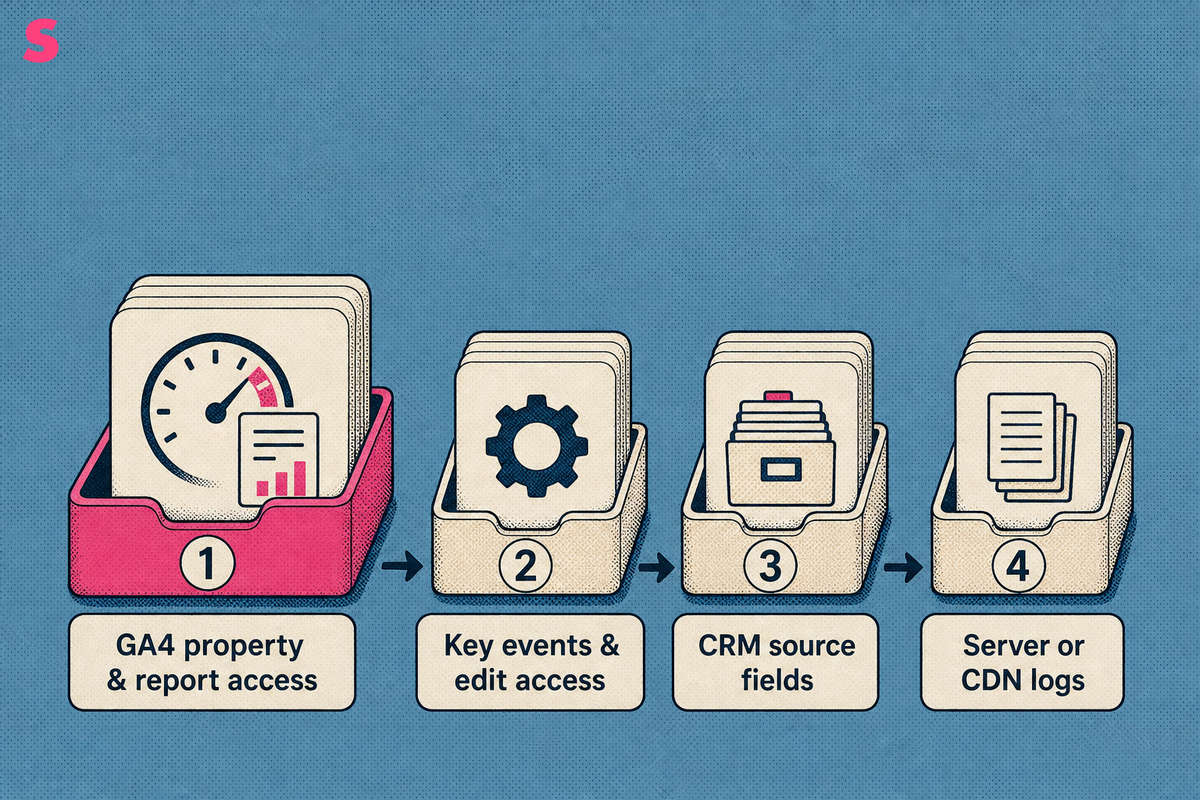
A functioning GA4 property and report access are sufficient to monitor ChatGPT referral traffic. Add key events and edit access when you need conversion analysis or custom channel configuration. Add CRM source fields only when measuring trials, pipeline, or closed-won revenue. Server or CDN logs can validate human referral visits when requests retain a referrer or identifying tracking parameter.
Configure key events before reviewing acquisition data for conversion analysis. For B2B SaaS, useful events include trial_start, demo_request, signup, activation, and qualified_lead. Use consistent CRM source values, such as chatgpt, so GA4 sessions can be matched with downstream pipeline records.
- GA4 property and report access for referral monitoring.
- Key events and edit access for conversion reporting, channel groups, Explorations, and event definitions.
- CRM fields for original source, latest source, and UTM values when measuring revenue.
- Server or CDN logs, when available, for retained referrer evidence.
Which ChatGPT tracking method fits your analytics setup and traffic volume?
Start with a GA4 source filter to validate whether ChatGPT referrals exist. Add a custom channel group and recurring report once referrals recur. Add CRM source capture when leads, opportunities, or revenue require attribution. Add log reconciliation when Direct undercount materially affects interpretation, and add a dedicated measurement layer when prompt, citation, crawler, or account-level context is required. Each later component supplements GA4 rather than replacing it.
ChatGPT sometimes adds utm_source=chatgpt.com to outbound links. That parameter identifies a visit in GA4. UTMs added by your team apply only to links you control, including campaign links in documents, newsletters, partner placements, and product content.
| Method | Best when | Setup effort | What it captures | What to add next |
|---|---|---|---|---|
| GA4 source filter | Validating whether ChatGPT referrals exist | Low | Sessions, engagement, landing pages, and key events by referrer | Custom channel group and recurring Exploration |
| UTM conventions | Teams placing links in owned campaigns or partner materials | Low | Tagged sessions with explicit source, medium, and campaign values | Hidden form fields and CRM source mapping |
| CRM source fields | Teams attributing trials, demos, pipeline, or revenue | Medium | Lead, account, opportunity, pipeline, and revenue records | GA4-to-CRM reporting and assisted-conversion analysis |
| Server-log checks | Direct undercount materially affects interpretation | Medium | Retained referrer evidence and crawler activity alongside browser analytics | Regular reconciliation against GA4 Direct traffic |
| Dedicated AI traffic tool | Teams requiring prompt, citation, crawler, or account-level context | Medium | AI-referred visits plus prompt and citation context | Daily prompt tracking and revenue attribution |
A brand-level visibility score is a dated snapshot, not an operating task. Sona AI Visibility shows which prompts and sources create visibility, then connects citations and AI-referred visits to pipeline and revenue. The result is prompt-level evidence for action rather than a single aggregate number.
How do you find ChatGPT traffic in GA4 Traffic acquisition?
Open Acquisition > Traffic acquisition, change the primary dimension to Session source / medium, and search for gpt. Review sessions, engagement rate, key events, and top landing pages for each matching source.
- Open the GA4 property and select Reports.
- Choose Acquisition, then Traffic acquisition.
- Change the table dimension to Session source / medium.
- Search for gpt and review matching rows.
- Compare sessions, engagement rate, key events, and landing pages.
- Save the filtered view in an Exploration for monthly reporting.
The clearest session source is chatgpt.com. A visit carrying utm_source=chatgpt.com also indicates a ChatGPT-originated session. Review deep content URLs, comparison pages, documentation, and pricing pages to identify the pages visitors reached after an AI answer.
GA4 supports an AI Assistant channel classification for ChatGPT-driven traffic. Use that channel for an initial view, then retain the source-level report because a channel total does not separate ChatGPT from other answer engines.
How do you group ChatGPT and other AI assistants into one GA4 channel?
Create a custom GA4 channel group with session-source rules for ChatGPT and other AI assistants, while retaining ChatGPT as its own source row. This creates a combined AI channel for executive reporting without blending ChatGPT into Perplexity, Gemini, Claude, organic search, paid search, or Direct.
- Create a custom channel group in GA4.
- Name the group AI Assistants.
- Add source rules using a regex that includes the domains or source values your property receives.
- Create a separate rule for chatgpt.com so ChatGPT remains reportable on its own.
- Add separate rules for Perplexity, Gemini, Claude, and other answer engines that appear in your acquisition data.
- Validate the group against Session source / medium before using it in reports.
GA4’s AI search channel classification can group traffic from ChatGPT, Perplexity, Gemini, Claude, and other answer engines. Use the channel for top-line trends, but use the source dimension for operational reporting because it identifies the assistant that sent each session.
Keep this report at the click layer. GA4 records visits that reach the site, not every AI answer where the brand appears. Sona AI Visibility provides prompt and citation context alongside AI-referred visits, while citation measurement remains separate from GA4 click analytics.
Why does ChatGPT traffic show up as Direct, and how do you recover it?
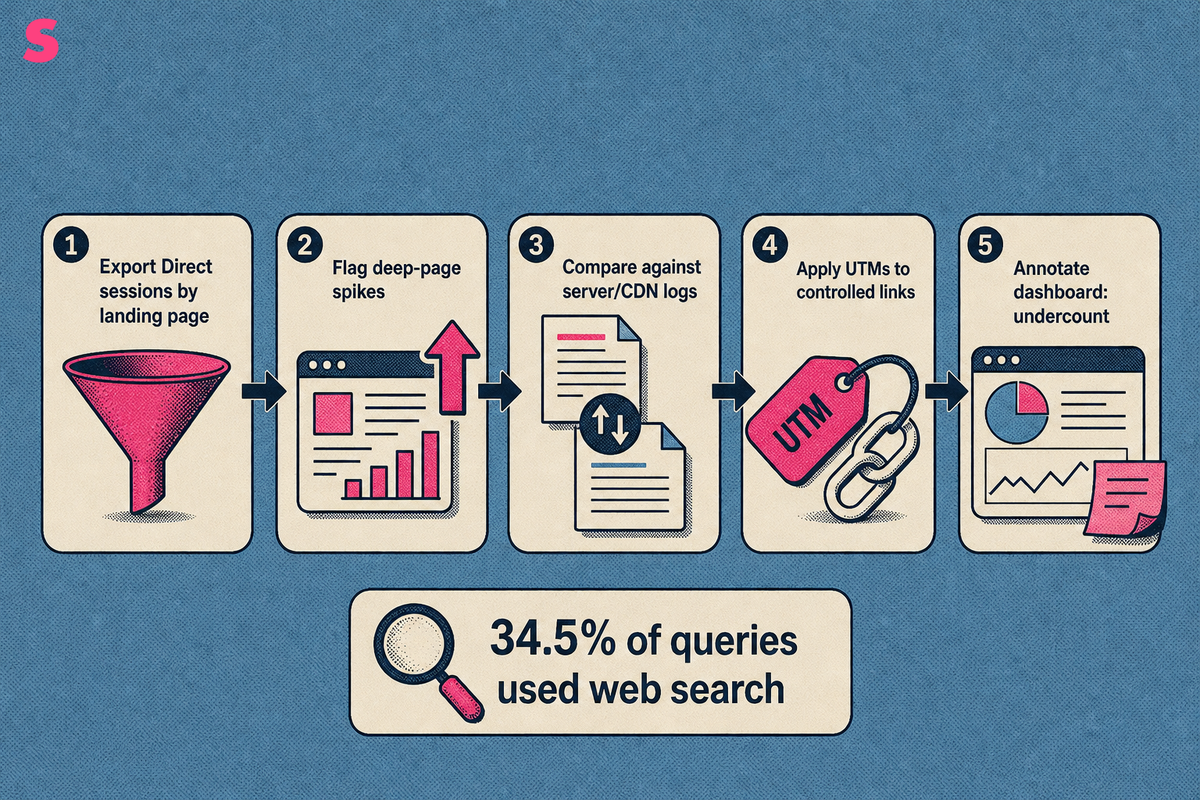
ChatGPT traffic appears as Direct when GA4 receives neither a tracking tag nor a browser referrer. Direct is a classification outcome, not proof that a visitor typed the URL into a browser.
Server or CDN logs can validate human referral visits when requests retain a chatgpt.com referrer or identifying tracking parameter. AI crawler activity is separate content-access evidence. Inspecting Direct landing pages for deep content URLs is an undercount heuristic, not recovered or reattributed ChatGPT traffic.
- Export Direct sessions by landing page from GA4.
- Flag deep pages with unusual Direct-session increases.
- Compare the period against server or CDN logs for retained referrers or tracking parameters.
- Apply UTMs to links your company controls.
- Annotate dashboards with an AI-referral undercount note.
ChatGPT enabled web search on 34.5% of queries as of February 2026. Browser-visible referrals are therefore meaningful but incomplete. AI referrals face the same attribution problem as dark traffic in traditional organic search when the referrer is removed before the session reaches GA4.
Sona AI Visibility tracks AI crawler activity from server logs or a lightweight edge worker, without a JavaScript tag, and connects AI-referred visits to revenue measurement. Crawler activity indicates that an AI system accessed content, while retained referrers or tracking parameters identify human referral visits.
What does working ChatGPT tracking look like, and what should the monthly report show?
Working ChatGPT tracking means a test visit from a ChatGPT link appears under the expected source after GA4’s standard reporting delay, and the source row includes sessions and key events. The monthly report should show a repeatable trend and identify unexplained Direct traffic on deep content pages.
Build a compact GA4 Exploration or Looker Studio view with five fields: sessions, engagement rate, key events, top landing pages, and month-over-month trend. Filter the report to the AI Assistants channel, then show ChatGPT as a separate source row.
- Sessions: whether ChatGPT sends measurable visits.
- Engagement rate: whether visitors continue beyond the landing page.
- Key events: whether the sessions create meaningful actions.
- Top landing pages: which pages earn AI-referred clicks.
- Monthly trend: whether the channel is growing or fluctuating.
Use a test link with a known UTM value before relying on the dashboard. The test succeeds when the expected session source, landing page, and key event appear in the same reporting workflow.
Sona AI Visibility can add AI crawler activity and citation context to the monthly review, while GA4 remains the system for click-level behavior. Use the dashboard to compare monthly periods, not to assess a single score without operating context.
How do you connect ChatGPT sessions to trials, demos, and closed-won revenue?
Connect ChatGPT sessions to revenue by passing GA4 source and UTM values into hidden form fields, then storing those values on trial, demo, account, and opportunity records in the CRM. Pipeline and closed-won revenue show whether ChatGPT creates commercial value.
Use a consistent convention for links you control: utm_source=chatgpt, utm_medium=ai_referral, and a specific utm_campaign value. Align conversion event names across GA4 and the CRM, such as trial_start, demo_request, qualified_lead, opportunity_created, and closed_won.
- Capture session source, medium, campaign, landing page, and first-touch date in hidden form fields.
- Write those values to the lead or contact record at conversion.
- Preserve first-touch and latest-touch source fields after the record becomes an account.
- Associate the account with an opportunity and closed-won revenue.
- Report ChatGPT-sourced trials, demos, pipeline, and revenue beside other acquisition sources.
ChatGPT visitors converted at 13.8%, compared with 3.02% for Google organic visitors across 55 sites, per searchengineland.com, October 2026. Google organic generated 96.5% of all conversions in that study because its traffic volume was far larger, per the November 2026 study listing.
Sona AI Visibility connects AI citations and prompts to pipeline and revenue on one account timeline, and resolves anonymous accounts behind AI-referred visits without cookies. Its AI Attribution capability ties AI-referred activity to accounts, pipeline, and closed-won revenue, including research that never produced a click when self-reported attribution is available.
Does ChatGPT send enough traffic to justify dedicated tracking?
ChatGPT traffic remains small beside Google organic traffic, but its conversion quality and growth justify dedicated tracking for B2B teams. Measure it as a distinct source before assigning budget rather than dismissing the channel because early session totals are small.
ChatGPT generated sessions equal to 0.62% of Google organic sessions across 100 websites and more than 145 million sessions, per searchengineland.com, October 2026. Including other LLMs raised that ratio to 0.73% of Google organic traffic, rather than 0.73% of total traffic, per searchengineland.com, October 2026.
ChatGPT represented 92.4% of standalone AI-referral traffic in a study of 6.77 million LLM-driven sessions across 166 websites and GA4 properties, per marketingtechnews.net, July 2026. In that study, ChatGPT sessions rose from 47,606 in November 2024 to 610,910 in May 2026, per marketingtechnews.net, July 2026.
Conversational-assistant traffic rose from 0.24% to 0.36% of total traffic across more than 3,000 sites, approximately 45% year over year, per ktbs.com, November 2026. ChatGPT referrals grew 5.7× while untreated pages on the same domains grew 3.5×, using first-party analytics and server logs, per arxiv.org, June 2026.
Track the channel because conversion quality and growth can affect pipeline allocation before volume becomes large. Sona AI Visibility connects that AI-referred demand to accounts and revenue rather than leaving it as a small, unexplained GA4 source.
Which tools track ChatGPT traffic beyond GA4, and what does each add?
GA4 measures click behavior after a ChatGPT visit reaches the site. Tools beyond GA4 add AI referral analysis, prompt context, crawler evidence, and citation measurement. Sampling, privacy controls, and attribution gaps still affect the data. Clicks are one layer, while uncaptured citations require prompt and citation tracking.
The pricing, engine coverage, prompt allowances, and cost figures below reflect public plan details as of October 2026. Sona AI Visibility connects AI citations and prompts to pipeline and revenue, tracks AI crawler activity without a JavaScript tag, and can infer the likely prompt behind an AI-referred visit.
| Tool | Starting price | Agency Plans? | # of Answer Engines Tracked | Answer Engines | # of Daily Tracked Prompts (entry plan) | Cost per Daily Tracked Prompt | Differentiation |
|---|---|---|---|---|---|---|---|
| Sona AI Visibility | From $75/month | Yes | Up to 11 (3 on Starter) | Not published | 5,000 credits/month, about 166 daily tracked prompts on one model or 56 across three | $0.45 per daily tracked prompt | Connects citations and prompts to pipeline and revenue, tracks AI crawler activity from server logs or a lightweight edge worker, and resolves anonymous accounts behind AI-referred visits without cookies. |
| Peec AI | From $95/month | Yes | Up to 13 (3 on Starter) | Not published | 50 prompts daily | $0.63 per daily tracked prompt | Tracks prompts across answer engines. |
Running the same prompt list daily reveals patterns that a weekly snapshot can obscure. Confirm that a change persists across repeated daily observations before treating it as a trend, because a one-day spike may reflect retrieval changes, model updates, or new competitor content.
What are the frequently asked questions about tracking ChatGPT traffic?
Can you track ChatGPT traffic in GA4 for free?
Yes. Open Acquisition > Traffic acquisition, switch to Session source / medium, and search for gpt. Save the filter as a custom channel group or Exploration so the ChatGPT traffic view persists without repeated report setup.
What referrer or UTM value identifies a ChatGPT visit?
The usual signal is a session source of chatgpt.com, and ChatGPT sometimes adds utm_source=chatgpt.com to outbound links. Visits carrying neither a referrer nor a tracking parameter can appear as Direct.
Why is my ChatGPT traffic so low in GA4?
Some ChatGPT visits are classified as Direct when no browser referrer or tracking tag arrives, and many ChatGPT answers create no click. Check Direct landing pages, compare deep URLs against server logs for retained referrer evidence, and annotate the likely undercount in reports.
Does ChatGPT traffic convert better than Google organic traffic?
In a study of 55 sites, ChatGPT visitors converted at 13.8% against 3.02% for Google organic visitors, per searchengineland.com, October 2026. Google organic still produced most total conversions because its traffic volume was much larger.
How do you tell ChatGPT apart from Perplexity, Gemini, Claude, and other answer engines in GA4?
Group sessions by source with a custom channel group or regex. Keep ChatGPT as its own row within an AI Assistants channel so each answer engine remains separately reportable in GA4.
Can you measure ChatGPT mentions that never produce a click?
Not in GA4, because no session exists when an AI answer creates no click. Measuring zero-click mentions requires prompt and citation tracking, a separate measurement layer from click analytics.
Summarize this article with AI: ChatGPT · Claude · Perplexity · Google AI Mode
Last updated: November 2026