An LLM seeding template is a structured sheet that standardizes which prompts you test, which engines you query, and what you record about brand mentions, citations, and errors. It makes observation repeatable but cannot guarantee that any model mentions or recommends a brand. Fields such as buying stage, engine, prompt variant, timestamp, and cited URL make spot checks comparable over time. Sona AI Visibility connects prompts and citations to pipeline and revenue, and tracks AI crawler and agent activity.
What is an LLM seeding template and what does it do?
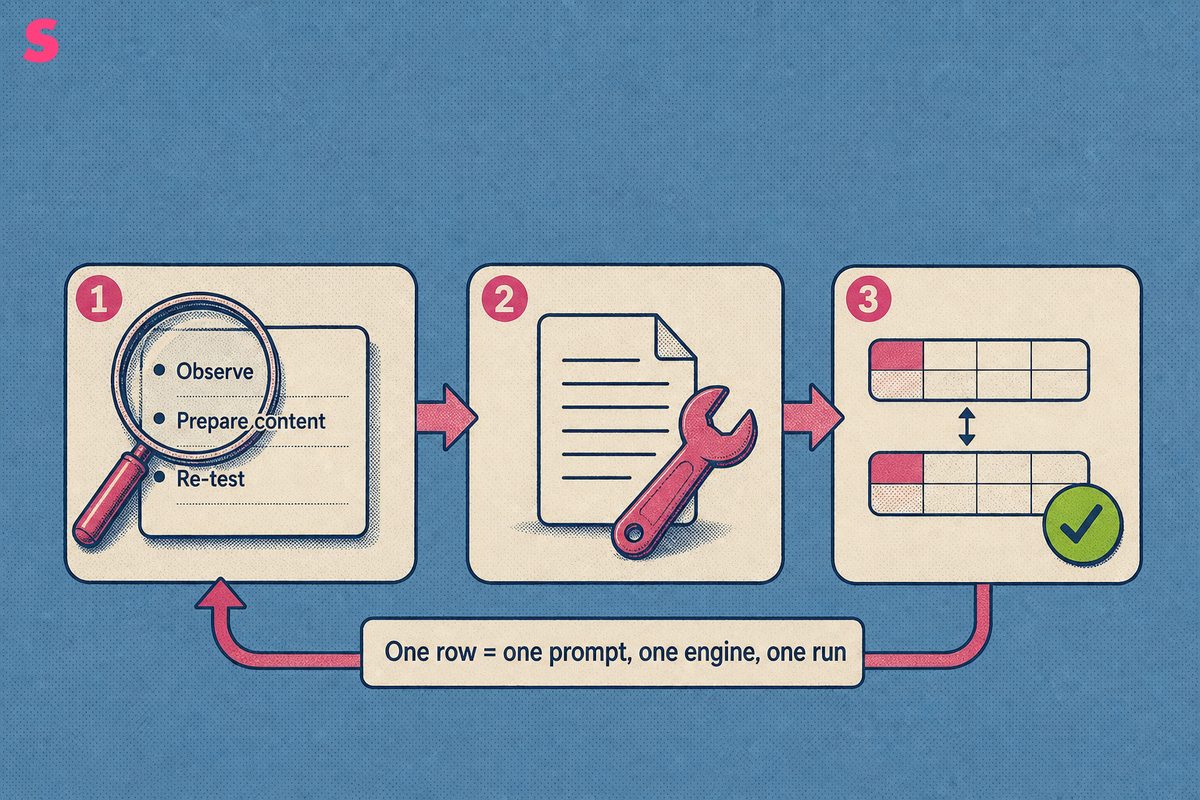
An LLM seeding template is a structured sheet that records the prompts you run, the AI engines that answer them, and what each answer says about your brand, with a follow-up action attached to every result. One row equals one prompt, one engine, one run.
LLM seeding means preparing and publishing content so that large language models mention, cite or recommend a brand when buyers ask relevant questions. The template seeds nothing by itself. It standardizes the observing, so the preparing rests on evidence.
Within answer engine optimization (AEO) and generative engine optimization (GEO), the sheet is the working record of a three-step loop:
- Observe: run a fixed prompt list and log every answer.
- Prepare content: fix the pages, sources and facts the log exposes.
- Re-test: run the same prompts again and compare against earlier rows.
Without that record, the loop collapses into opinion about what ChatGPT said last Tuesday.
Why does a B2B team need an LLM seeding template?
Ad hoc prompt checks produce anecdotes, and anecdotes cannot decide where a content budget goes. A shared schema turns each check into comparable data that names the page, source or fact to fix next.
The job differs by role. A founder wants to know whether buyers asking for a shortlist see the company at all. A content lead needs a ranked list of pages and third-party sources to improve. A demand gen lead needs to know which results are worth money.
That last question is where Sona AI Visibility goes past logging: it connects AI citations and prompts to pipeline and revenue on one account timeline, so a mention becomes something measurable rather than a number to report.
Comparable rows also guard against two errors: reacting to one surprising answer, and ignoring a wrong fact repeated across engines. Consistent fields make both visible.
What fields should an LLM seeding template include?
A seeding template needs 14 fields, entered as columns with one row per prompt, engine and run. Four describe the buyer: audience, buying stage, problem statement and comparison intent. Four describe the run: geography, engine, prompt variant and timestamp. Six capture the outcome: brand mention, cited URL, competitor mentions, sentiment, factual errors and follow-up action.
| Field | What to record | Format | Why it matters |
|---|---|---|---|
| Audience, buying stage | Job title or segment; Awareness, Consideration, Decision or Purchase | Pick list | Separates a finance director's shortlist question from a practitioner's how-to. |
| Problem statement, comparison intent | The pain point in buyer words; whether the prompt compares vendors | Free text; yes or no | Ties every prompt to a real buying situation, not product jargon. |
| Geography, engine | Country and language; engine name and mode | Pick list | Answers differ by location and engine, so rows compare only like with like. |
| Prompt variant, timestamp | Variant type and exact prompt text; date and time of the run | Pick list; date-time | Exact wording is the experiment, and timestamps build the series. |
| Brand mention, cited URL | Absent, mentioned or recommended, with position; every source shown | Pick list; URL | Shows visibility and which page or third-party source earns the citation. |
| Competitor mentions | Competitors named, in order of appearance | Text list | Reveals who holds the slot you want. |
| Sentiment, factual errors | Positive, neutral or negative; each wrong claim, verbatim | Pick list; text | Errors become fix tickets; sentiment flags framing. |
| Follow-up action | Owner, action and due date | Text | Turns the row into work. A row without an action taught nothing. |
How do you write prompts and pick engines to test whether AI answers mention, recommend or cite your brand?
Write four prompt variants for each buyer problem, in neutral buyer language, and run each one on every engine your buyers use. The four variants are problem, comparison, recommendation and category.
- Problem: describes a pain with no brand named, such as late invoices.
- Comparison: asks how two or more named options differ.
- Recommendation: asks for the best option for a stated context.
- Category: asks which tools exist for a job.
Avoid leading prompts. A prompt that asks why your brand is the best invoicing tool presupposes the answer and inflates the result. Name the brand only in comparison prompts, where a buyer would. Keep wording identical between runs and change one element at a time, so a shift in the answer has one cause.
A B2B SaaS team should test seven engines: ChatGPT, Google AI Overviews, Google AI Mode, Perplexity, Gemini, Claude and Microsoft Copilot. Each retrieves and phrases answers differently, so a brand can be cited on one engine and absent from another. Sona's own AI visibility data, September 2026, covers eight answer surfaces in its archive: ChatGPT, Google AI Overviews, Perplexity, Google AI Mode, Gemini, Mistral, Qwen and Claude. Log engine and mode as separate values, so Google AI Mode runs are never pooled with Google AI Overviews runs.
What does a filled-in LLM seeding template look like for a B2B SaaS brand?
A filled-in template is a short set of dated runs that each end in an action, recorded in all 14 fields. Start from this blank header row, which is ready to copy into a spreadsheet.
| Audience | Buying stage | Problem statement | Comparison intent | Geography | Engine | Prompt variant | Timestamp | Brand mention | Cited URL | Competitor mentions | Sentiment | Factual errors | Follow-up action |
|---|
The four runs below are illustrative: Brightlane is a fictional invoice automation brand, and every result is invented to show how the fields work, not measured data. The table is turned on its side so that all 14 fields fit; in the sheet, each run is one row.
| Field | Run 1 | Run 2 | Run 3 | Run 4 |
|---|---|---|---|---|
| Audience | Finance director, mid-size company | Finance manager, mid-size company | Operations lead, 50-person SaaS company | Accounts receivable manager |
| Buying stage | Awareness | Decision | Consideration | Awareness |
| Problem statement | Invoices go out late | Choosing between two invoicing tools | Shortlisting invoice automation | Chasing overdue payments |
| Comparison intent | No | Yes | No | No |
| Geography | United States, English | United Kingdom, English | United States, English | Canada, English |
| Engine | ChatGPT | Perplexity | Google AI Overviews | Gemini |
| Prompt variant | Problem: how do finance teams stop invoices going out late? | Comparison: Brightlane versus Competitor A for mid-size teams | Recommendation: best invoice automation tool for a 50-person SaaS company | Category: which tools automate receivables follow-ups? |
| Timestamp | 2026-09-14 09:05 | 2026-09-14 09:12 | 2026-09-14 09:20 | 2026-09-14 09:27 |
| Brand mention | Absent | Mentioned | Recommended, third of four | Absent |
| Cited URL | Industry blog guide | Brightlane pricing page | Third-party review roundup | Competitor A documentation |
| Competitor mentions | Competitor A, Competitor B | Competitor A | Competitors A, B and C | Competitor A |
| Sentiment | Not applicable | Neutral | Positive | Not applicable |
| Factual errors | None | Retired pricing tier named | None | None |
| Follow-up action | Content lead: publish a how-to page that answers the problem with a named workflow; due 2026-09-28 | Web lead: update the pricing page with a dated plan table; due 2026-09-21 | Partnerships lead: request an updated listing from the roundup publisher; due 2026-09-28 | Content lead: publish a category explainer with FAQPage schema; due 2026-10-05 |
Each run ends in a different action: a content gap, a factual correction, a source to pursue. That is the test of a good row. An empty follow-up field means the run taught the team nothing.
How do you score brand visibility, citation frequency, recommendation position, sentiment and accuracy?
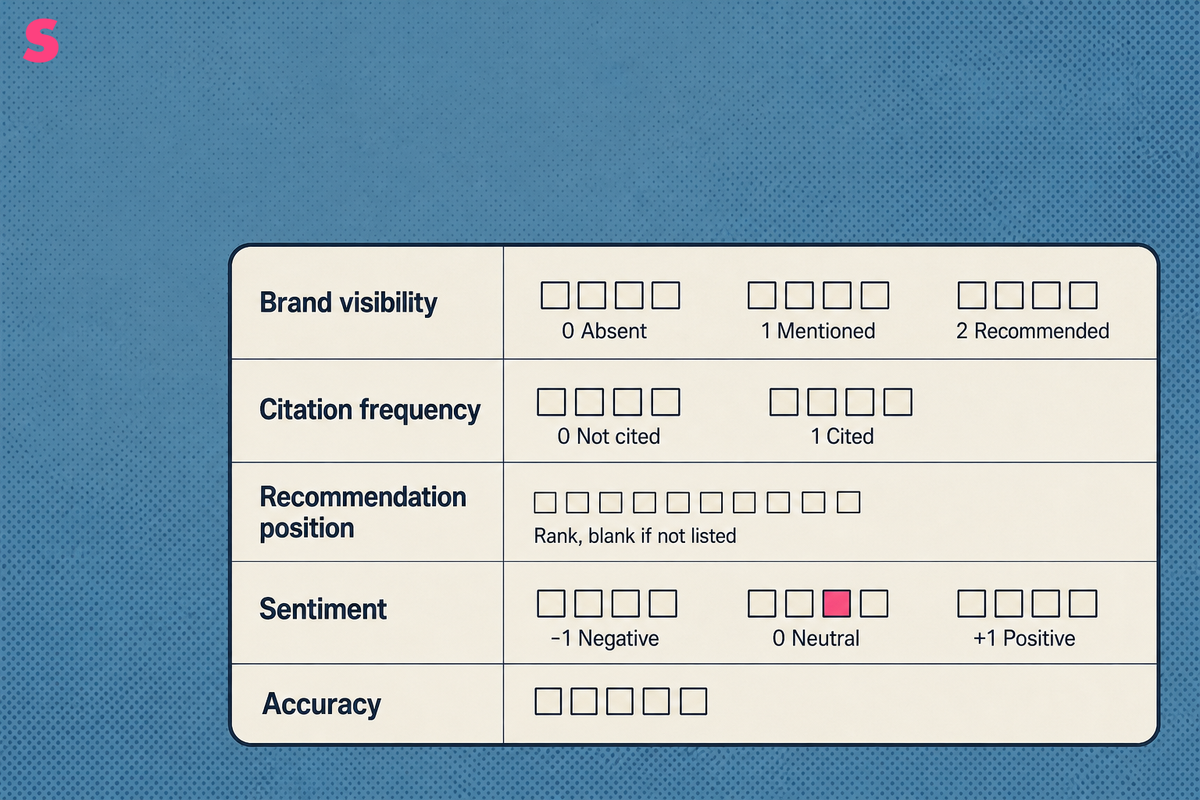
Score each run on five plain scales, then aggregate across repeated runs, because one answer is one sample, not a result. Each scale is deliberately coarse, so two reviewers score the same answer the same way.
- Brand visibility: 0 for absent, 1 for mentioned, 2 for recommended.
- Citation frequency: 1 when an answer cites a page on your domain, 0 when it does not; report the share of runs.
- Recommendation position: rank in the answer's list, left blank if the brand is not listed.
- Sentiment: -1 negative, 0 neutral, +1 positive.
- Accuracy: 1 when every claim about the brand is correct, 0 when any claim is wrong.
To aggregate, run each prompt on each engine daily and report rates, not single scores. A brand mentioned in 4 of 5 daily runs has a mention rate of 80%. Average recommendation position only across runs where the brand appeared. Predefine your own repeated-run threshold for calling a change a trend, compare like-for-like runs, and never treat a single run as a trend.
A brand-level score is not a work item. Knowing it fell does not say which prompt lost the mention or which source replaced you. Sona AI Visibility works at that level, showing which prompts surface or miss a brand, which sources engines cite, and how competitors rank on each tracked prompt.
Which tools can run the template's prompts automatically, and how do prices differ?
Seven tools can run the template's prompts on a schedule: Sona AI Visibility, Peec AI, Otterly.ai, PromptWatch, Profound, Scrunch AI and AthenaHQ. Public entry prices run from $29/month for Otterly.ai to $295/month for AthenaHQ, Sona AI Visibility starts at $75/month for brands billed annually, and Profound is quote-only.
Prices were read from each vendor's own pricing page in August 2026 for Sona and Peec AI, September 2026 for PromptWatch and October 2026 for the rest. The cost column divides each entry price by the AI answers that plan buys per day, on one denominator: one prompt, one model, once a day. Vendors count prompts differently, so headline prompt counts are not comparable without that step. The figures are unit prices, not a ranking.
| Tool | Starting price | Agency Plans? (Yes/No) | # of Answer Engines Tracked | Answer Engines | # of Daily Tracked Prompts (entry plan) | Cost per Daily Tracked Prompt | Differentiation |
|---|---|---|---|---|---|---|---|
| Sona AI Visibility | Brands from $75/month, agencies from $199/month, both billed annually. 14-day free trial, no credit card. Unlimited seats and API/MCP access on every plan | Yes | 11 | ChatGPT, Gemini, Google AI Mode, Google AI Overviews and Perplexity on standard, plus Claude, DeepSeek, Grok, Copilot, Qwen and Mistral on premium | 5,000 credits/month on Starter 5K, about 166 daily tracked prompts on one model or 56 across three. 1 credit = 1 AI answer | $0.45 per daily tracked prompt | Connects AI citations and prompts to pipeline and revenue on one account timeline; tracks AI crawler activity with no JavaScript tag |
| Peec AI | From $80/month (Starter), $205 (Pro), $420 (Advanced), Enterprise custom, billed annually. Unlimited users on every plan; 50, 150 and 350 prompts by tier | Not published | 6 | ChatGPT, Google AI Mode, Google AI Overviews, Microsoft Copilot, Perplexity and Gemini | 50 on Starter, 150 on Pro, 350 on Advanced | No refresh cadence published | Unlimited users on every plan |
| Otterly.ai | From $29/month (Lite), $189 (Standard), $489 (Premium) billed monthly, or $25, $160 and $422 a month billed annually; Enterprise custom. Free trial, no commitment. 15% off annual; unlimited team members on every plan; Enterprise starts from 1,000 prompts | Not published | 4 | ChatGPT, Google AI Overviews, Perplexity and Microsoft Copilot | 15 on Lite, 100 on Standard, 400 on Premium, checked daily on every plan | $0.48 per daily tracked prompt | Free trial, unlimited team members on every plan; Enterprise from 1,000 prompts |
| PromptWatch | Essential $95/month, Professional $245, Business $579. Agency plans from $199/month (Kick-off). | Yes | 4 | ChatGPT, Claude, Gemini and Perplexity | 50 prompts and 6,000 responses/month on Essential, with 500 agent credits | $0.48 per daily tracked prompt | Named agency tier alongside single-brand plans |
| Profound | Quote-only, no public pricing. 7-day free trial: 50 prompts, run daily. No self-serve price is published: a 7-day trial and custom Enterprise pricing only | Not published | 3 | ChatGPT, Gemini and Google AI Overviews | 50 prompts run daily on the 7-day trial; Enterprise allowances are custom | No refresh cadence published | Custom Enterprise pricing after a trial |
| Scrunch AI | From $250/month (Starter) or $300 monthly, $417 (Growth) or $500 monthly, Enterprise custom. 7-day trial of Starter, no credit card. 17% discount on annual billing | Not published | 6 | ChatGPT, Claude, Gemini, Perplexity, Google AI Mode and Google AI Overviews, and Meta | 350 custom prompts plus 1,000 industry prompts on Starter; 700 plus 2,500 on Growth | No refresh cadence published | Custom and industry prompts counted separately; 7-day Starter trial, no credit card |
| AthenaHQ | From $295/month (Starter) billed monthly, 17% off annually; Enterprise custom. Free Essential tier with 300 credits. 17% off annual; 1 credit = 1 AI response | Not published | Not published | Not published | 3,600 credits on Starter, where 1 credit is 1 AI response. 300 credits on the free Essential tier | $2.46 per daily tracked prompt | Free Essential tier with 300 credits |
Rows reading No refresh cadence published cannot be put on the daily basis without inventing a cadence, so no cost figure is shown.
How is an LLM seeding template different from an SEO content brief, keyword map or prompt library?
A seeding template records observed AI answers and links each one to an action. An SEO content brief, a keyword map and a prompt library are planning or storage documents; none of them records what an AI engine returned.
- SEO content brief: plans one page, with its target query, outline and sources. It comes before publishing and says nothing about answers.
- Keyword map: assigns search terms to URLs. Search volume is not prompt volume, so a keyword map cannot show which prompts matter.
- Prompt library: stores prompts for reuse. It has no result, citation or error columns.
The documents connect in sequence. The keyword map and prompt library feed the prompt list; the seeding template logs the answers; each follow-up action produces a new content brief.
Can you actually seed an LLM, and where does the template stop working?
No one can seed an LLM with a guaranteed result. The template standardizes observation and content preparation; it guarantees no mention, citation or position. Five limits define where it stops working:
- Personalization: answers shift with account history and location, so a logged answer is one user's view.
- Model variability: the same prompt returns different answers between runs.
- Localization: an answer in one country and language does not carry to another, so geography is logged.
- Prompt bias: wording changes results, and leading prompts inflate them.
- No guaranteed influence: publishing a page does not force a citation.
The remedy is repetition. Run the prompt list daily and judge trends across runs, never a single result. Sona AI Visibility also tracks AI crawler activity, which shows whether the crawl step in front of a citation is intact, because a page no bot reaches cannot be cited.
Frequently Asked Questions
What is an LLM seeding template?
A structured sheet that records the prompts, engines and results used to check whether AI answers mention, cite or recommend your brand. Each row also carries the follow-up action that result triggers, which turns observation into content work.
Does LLM seeding guarantee that ChatGPT will mention my brand?
No. The template standardizes observation and content preparation. Model variability, personalization and prompt wording mean no answer can be guaranteed, so judge progress by trends across repeated runs.
How many prompts should a seeding template start with?
Start with a small, deliberate set for each buying stage and audience. Expand once the fields and scoring produce consistent results across runs. No fixed number works as a universal rule.
Summarize this article with AI: ChatGPT · Claude · Perplexity · Google AI Mode
Last updated: October 2026