To rank in Google AI Overviews, satisfy Google's standard Search requirements, then create pages where individual passages address likely sub-questions in standalone, text-based language. Google says there is no separate eligibility system, so the task is traditional SEO combined with extractable structure. Overview clicks are not identified in GA4, so track them through Search Console's Generative AI tab and a fixed prompt set, which Sona AI Visibility runs daily across Google AI Overviews and other answer engines. Validate every change against that set before relying on any tactic.
What does it mean to rank in Google AI Overviews, and is there a separate SGE-style algorithm?
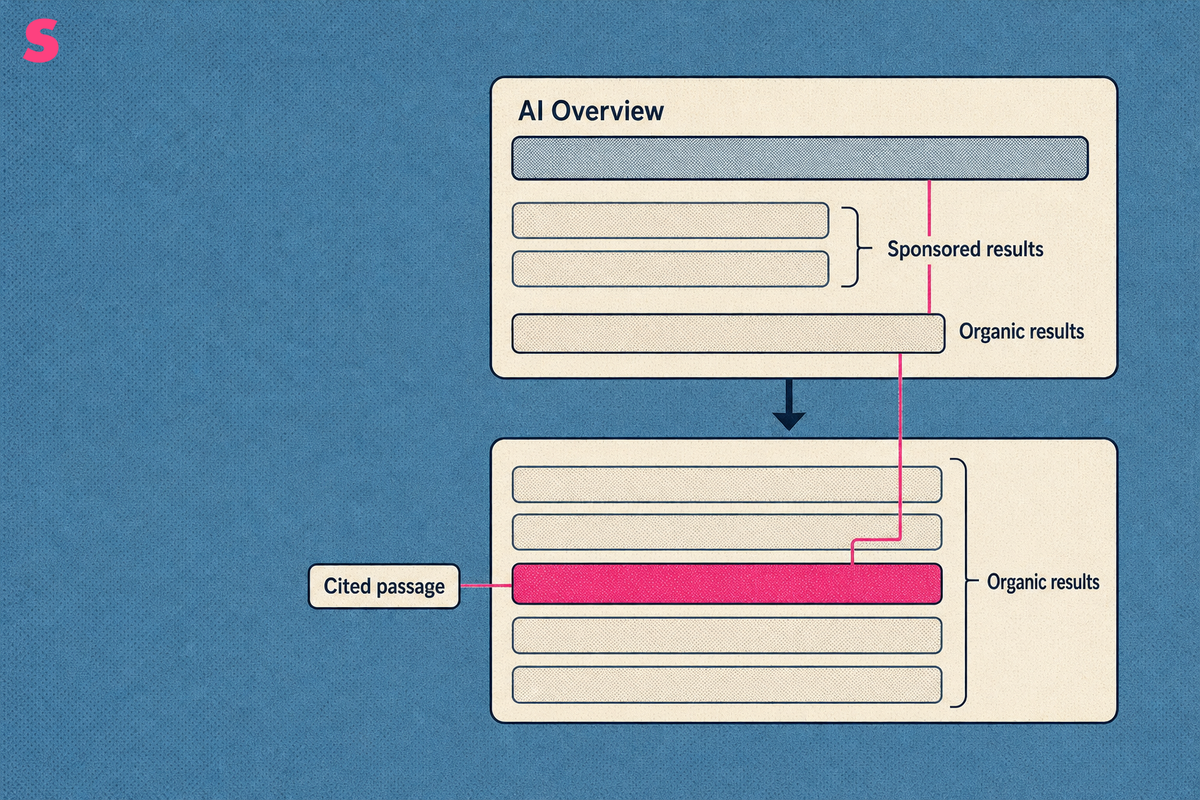
To rank in Google AI Overviews means that Google cites your page as a source within an AI-generated answer. Google AI Overviews can appear at the top of search results or below sponsored and unpaid results, per the October 2026 listing.
Google does not describe a separate SGE-style eligibility system. Pages must meet normal Google Search technical requirements and qualify for snippets, per developers.google.com, updated October 2, 2026.
Google AI Overview visibility extends search visibility rather than creating a separate channel with a secret formula. Ranking factors broadly resemble traditional organic search factors, per the October 2026 listing, but citation decisions happen at the passage level. Google can select a source that answers one part of a broader query precisely.
For teams learning how to rank in AI Overviews, the objective is to make each page crawlable, useful, specific, and easy to extract. A page does not need to answer every question. It needs to provide a credible answer to a sub-question within the result.
What must be true of a page before Google AI Overviews can cite it?
A page needs normal Google Search eligibility, snippet eligibility, accessible text, and content that answers the query better than alternatives. Google also identifies two core content requirements: important information should be available in text, and relevant high-quality images or videos should support that information where appropriate, per developers.google.com, updated October 2, 2026.
Prerequisite: choose a page with a clear search purpose. Do not start with a thin feature page, an orphaned resource, or a page serving several unrelated audiences.
- Step 1: Confirm crawlability. Check robots.txt, canonical tags, indexability, server-rendered HTML, and HTTPS. A strong technical SEO foundation supports Google AI Overviews, per the October 2026 listing.
- Step 2: Confirm snippet eligibility. Review preview controls before changing content. Google recommends managing search visibility with preview settings, per developers.google.com.
- Step 3: Check page experience. Review Core Web Vitals and other rendering or usability issues that could weaken the page experience.
- Step 4: Put the answer in visible text. Do not place essential definitions, proof, or instructions only inside images, video, accordions, or client-rendered components.
- Step 5: Remove ambiguity. Give each page one primary job, such as explaining a process, comparing options, or answering a product evaluation question.
Google recommends unique, valuable content for people, a strong page experience, accessible content, and deliberate preview settings, per developers.google.com, updated October 2, 2026. These requirements determine whether Google can consider the page.
How do you map a page to the sub-questions Google AI Overviews is likely to ask?
Map one target keyword to one Google AI Overview intent, then build the page around the sub-questions a buyer needs answered before acting. An October 2026 listing recommends restructuring each target page around associated sub-questions rather than optimizing only for the head keyword.
Google AI Overviews can break a broad search into narrower retrieval tasks. Build the page around the questions required to answer those tasks, rather than relying on one broad explanation.
- Write the primary question in the buyer’s language.
- Add long-tail, informational question variants that reveal definitions, comparisons, objections, procedures, and examples.
- Assign each sub-question to one section, table, list, or answer passage.
- Check whether the page has a distinct sourceable statement for every important sub-question.
A brand-level visibility score is not a work item because it cannot identify the prompts or cited sources behind a result. Sona AI Visibility connects citations to pipeline and revenue, while AI Search Insights shows the prompts buyers ask and the sources AI cites, giving teams prompt-level evidence for deciding which page needs work.
For example, a SaaS page about attribution software might need separate passages for implementation, data sources, reporting, pricing model, and buyer fit. One broad paragraph rarely serves every retrieval task. Clear sub-answers give Google more usable citation candidates.
How should each answer passage be written so Google AI Overviews can lift it?
Write each answer passage as a direct response, then support it with explanation, evidence, or a practical condition. A current October 2026 listing recommends direct-answer capsules of 2–4 sentences, while another October 2026 listing recommends paragraphs of 2–3 sentences for readability and extraction.
Start with a complete claim that makes sense outside the page. Follow with the condition, example, or procedural detail that supports the claim. Avoid broad market observations and vague transitions.
- Definition content: state what the term means, then distinguish it from the adjacent term.
- How-to content: use ordered steps with the action and expected output.
- Comparison content: use a table when readers must compare criteria across options.
- Evidence content: put the claim, source, and date in the same passage.
Tables help readers compare options, while lists clarify steps, features, and examples, per the October 2026 listing. Formatting does not create authority, but it helps Google identify, interpret, and cite a useful answer.
What makes a SaaS page worth citing once the formatting is done?
A SaaS page becomes citation-worthy when it answers a buyer’s decision question with specific, original, verifiable information. Formatting makes content extractable, but substance determines whether the answer is useful.
Build pages around material competitors cannot reproduce by rewriting generic advice. Useful material can include a defined methodology, product constraints, implementation detail, first-party data, decision criteria, or a transparent explanation of trade-offs. Google recommends unique and valuable people-first content, per developers.google.com, updated October 2, 2026.
Support important entities, products, and relationships with appropriate schema markup. Build topical authority through related content clusters and internal links that connect the core page to supporting definitions, comparisons, and procedures. Brand mentions and relevant backlinks can also reinforce the external signals around a credible source.
Review publication dates, factual claims, product details, and supporting evidence before updating a page. Replace stale material, correct claims that no longer hold, and preserve clear ownership of original evidence.
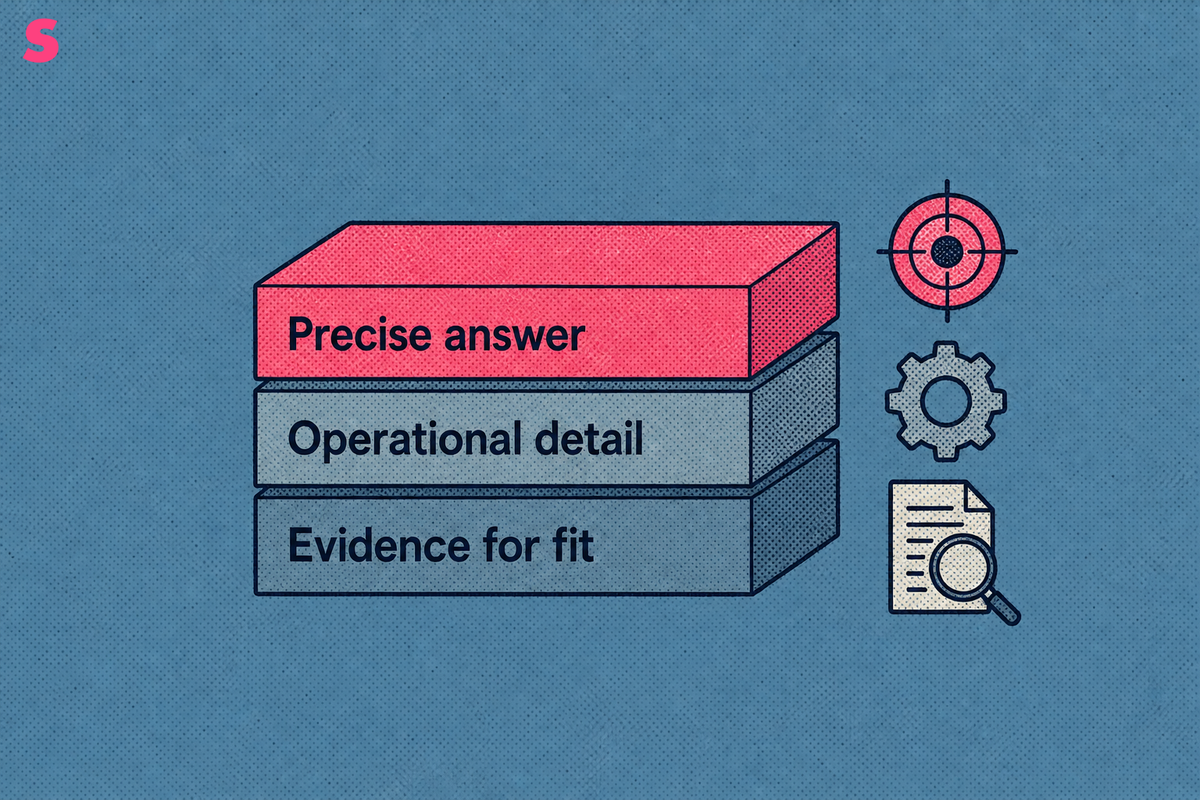
For a B2B SaaS company, a credible page often combines three layers:
- A precise answer to the buyer’s question.
- Operational detail that proves the company understands the work.
- Evidence that helps the buyer evaluate fit.
Featured-snippet-style structure remains useful because direct answers, strong authority, and question-led content are established optimization strategies for Google AI Overviews, per the October 2026 listing. Do not manufacture expertise with unsupported claims. Add details your product, customers, or operating model can substantiate.
How do you test whether an AI Overview tactic actually worked?
Test one page change against a fixed prompt set, using the same country, device, and observation windows before and after publication. The editorial sample is one exact target prompt plus controlled wording variants that preserve the same intent.
Worked test artifact: target prompt: how to rank in Google AI Overviews. Controlled variants: how can a page get cited in Google AI Overviews and what helps a page rank in Google AI Overviews. Record a baseline during a predefined observation window, publish one material change, then record the same prompt set during an equally defined post-change window.
For every observation, record whether a Google AI Overview appears, which pages it cites, and whether your page is cited, per the October 2026 listing. Score each prompt as present or absent for AI Overview presence, page citation, and target-passage match. Mark citation persistence when the citation appears across both observation windows, and record any unintended changes, such as a different page receiving the citation.
Filled example: before the change, the target prompt produced a Google AI Overview without citing the tested page. After adding a direct definition and a sub-question section, the overview appeared, cited the tested page, and matched the revised passage. The controlled variants remained uncited, so the result supports the specific passage hypothesis rather than a broader claim.
- Choose one hypothesis, such as adding a direct definition or a comparison table.
- Document the exact target prompt, controlled variants, sample definition, and observation windows.
- Record baseline status for AI Overview presence, cited pages, page citation, passage match, and unintended changes.
- Publish one material change to the page.
- Track the same prompts consistently through the post-change observation window and compare the completed scorecard.
The table below compares tools for tracking answer-engine visibility. Prices and plan details are as of October 2026. Most tools report citations or mentions; Sona AI Visibility connects citations and AI-referred visits to pipeline and revenue on one account timeline.
| Tool | Starting price | Agency Plans? (Yes/No) | # of Answer Engines Tracked | Answer Engines | # of Daily Tracked Prompts (entry plan) | Cost per Daily Tracked Prompt | Differentiation |
|---|---|---|---|---|---|---|---|
| Sona AI Visibility | From $75/month | Yes | Up to 11 (3 on Starter) | Not published | 5,000 credits/month, about 56 prompts tracked daily on three engines | $0.45 per daily tracked prompt | Connects AI citations and prompts to pipeline and revenue on one account timeline |
| Profound | Custom pricing | Yes | Up to 9 (3 on free Trial) | ChatGPT, Perplexity, Google AI Mode, Gemini, Microsoft Copilot, DeepSeek, Claude, Google AI Overviews, Exa Search | Not published | Unit cost cannot be derived from custom pricing | AI answer tracking across Enterprise plans |
| Peec AI | From $95/month | Yes | Up to 13 (3 of 6 on Starter, plus add-ons) | Not published | 50 prompts daily | $0.63 per daily tracked prompt | Citation and mention tracking across AI engines |
| Otterly.ai | From $29/month | Yes | Up to 7 (4 on Lite, 3 as paid add-ons) | ChatGPT, Google AI Overviews, Perplexity, Microsoft Copilot | 15 prompts daily | $0.48 per daily tracked prompt | AI search visibility monitoring across listed engines |
| Scrunch AI | From $250/month | Yes | Up to 9 (4 on Core) | ChatGPT, Perplexity, Google AI Overviews, Microsoft Copilot | 125 prompts | No refresh cadence published | AI visibility tracking across Core and Enterprise plans |
| AthenaHQ | From $295/month | Yes | 11 | Not published | 3,600 credits/month, unlimited prompts | No refresh cadence published | Credit-based AI response monitoring |
| PromptWatch | From $95/month | Yes | Not published | Not published | 50 prompts daily | $0.48 per daily tracked prompt | Prompt monitoring with monthly response allowances |
How do you track Google AI Overview impressions and citations?
Track Google AI Overview impressions in Google Search Console, then pair that reporting with a daily prompt-level citation log. Open Search Console, choose Performance, select Search results, and click the Generative AI tab, per linkedin.com.
Google Search Console counts Google AI Overview citations as impressions even when AI Overviews reduce clicks from standard organic results, per the October 2026 listing. Impressions measure inclusion, but they do not measure commercial impact.
The Generative AI report can break performance down by page, country, device, and date, per the October 2026 listing. Use those dimensions to identify pages gaining impressions without clicks, then inspect the cited passage and query intent before changing the page.
Sona AI Visibility tracks mentions and citations across AI engines and connects resulting AI-referred activity to pipeline and revenue. That connection matters when a cited page creates awareness but another page captures the conversion.
Can you measure traffic and conversions from Google AI Overviews in GA4?
GA4 cannot isolate Google AI Overview clicks through a distinct referrer because Google AI Overview referrals pass no unique referrer, per the October 2026 listing. GA4 records those visits as ordinary organic traffic rather than as a separate Google AI Overview channel.
Measure the effect indirectly. Compare Search Console Google AI Overview impressions with landing-page sessions, assisted conversions, form submissions, and pipeline changes over the same date range. Use a stable page set and annotate major content releases, campaigns, and site changes.
- Identify pages receiving Generative AI impressions in Search Console.
- Set a pre-change baseline for those landing pages in GA4.
- Compare landing-page organic sessions and conversions after the page change.
- Check whether the increase aligns with sustained citation observations from the prompt log.
Sona AI Visibility connects AI citations and AI-referred visits to accounts, pipeline, and closed-won revenue on one timeline. It also captures self-reported attribution through a “How did you hear about us?” field, which helps record AI research that never produced a measurable click.
How can you tell the optimization worked, and what do you do when a page still is not cited?
An optimization worked when the page earns sustained Google AI Overview citations for the intended prompt set and search performance improves in a way that matches the test record. One appearance is a snapshot. Repeated daily observations provide evidence.
Do not treat a single visibility score as the final outcome. A score is a dated snapshot, while a series of observations shows whether a change held. Sona AI Visibility provides page-level prompt and citation data so teams can identify the page and prompt behind movement.
When a page is not cited, recover in this order:
- Recheck crawlability, canonical tags, snippet eligibility, and visible text.
- Compare the page against cited sources to identify missing sub-questions.
- Rewrite the weakest passage as a direct answer with supporting detail.
- Add original proof, product detail, or a clearer decision framework.
- Run the same prompt list consistently after publication and reassess using the predefined observation window.
Use a technical readiness assessment to identify crawlability and parsing conditions that need review. Ongoing page work still requires a prompt log and severity-ranked fixes tied to affected content.
Frequently asked questions about ranking in Google AI Overviews?
Is there a separate algorithm for ranking in Google AI Overviews?
No separate Google AI Overview eligibility system is specified in Google’s guidance. Pages need to meet normal Google Search technical requirements and qualify for snippets, per developers.google.com, updated October 2, 2026. Optimization therefore focuses on search eligibility, extractable passages, useful content, and source credibility.
Do I need to rank in the top 10 to be cited in Google AI Overviews?
The supplied evidence establishes organic visibility as a foundation for Google AI Overview citations, but it does not establish a universal top-10 requirement. Google can select sources for related sub-queries and individual passages, so teams should focus on search eligibility, precise answers, and well-supported content.
Where do I find AI Overview impressions in Google Search Console?
Open Google Search Console, go to Performance, select Search results, and click the Generative AI tab, per linkedin.com. Google Search Console counts citations as impressions, per the October 2026 listing, so compare impressions with clicks, landing-page sessions, and conversion performance.
Why does GA4 show no traffic labelled as Google AI Overviews?
GA4 does not show a dedicated Google AI Overview traffic label because Google AI Overview clicks pass no distinct referrer, per the October 2026 listing. GA4 records those visits as ordinary organic traffic. Use Search Console Generative AI reporting and before-and-after landing-page comparisons to assess impact.
How long should an answer passage be to get cited in Google AI Overviews?
An October 2026 listing recommends a direct-answer capsule of 2–4 sentences, and another October 2026 listing recommends paragraphs of 2–3 sentences. Treat those lengths as testable hypotheses, not fixed rules. The passage must answer the sub-question completely and provide support that makes the answer worth citing.
Can I stop my content from appearing in Google AI Overviews?
Google identifies preview settings as the control for managing search visibility, per developers.google.com, updated October 2, 2026. A nosnippet directive removes a page’s snippet eligibility. Consider the trade-off carefully because the same control also affects standard Google Search snippets.
Summarize this article with AI: ChatGPT · Claude · Perplexity · Google AI Mode
Last updated: October 2026