Recovering lost AI search visibility starts with proof: re-run a fixed prompt set across the same engines, locations and logged-out states for two to three weeks before changing a single page, because one run cannot separate a real drop from model volatility. Then match the pattern to a cause, whether that is blocked crawlers, stale pages, or a competitor now cited in your place. Sona AI Visibility connects the prompts and citations behind AI-referred visits to pipeline and revenue, and tracks AI crawler activity from server logs. Fix the cause, not the symptom.
What do you need in place before you can diagnose an AI visibility drop?
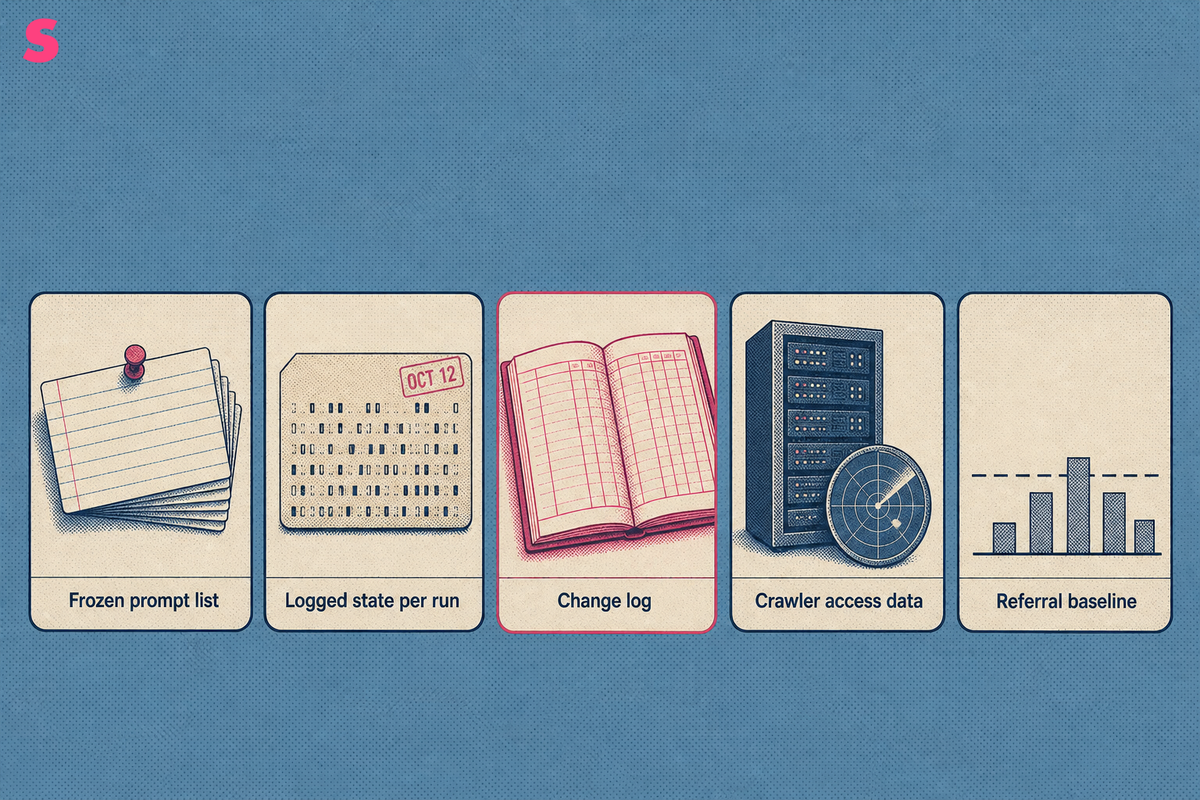
Five things, and without them any explanation is a guess: a frozen prompt set, the session state recorded with every run, a change log for your site, server-side evidence of which AI crawlers reached your pages, and a baseline of AI-referred sessions. Diagnosis is a comparison. You cannot compare against a baseline you never recorded.
Assemble these before you change anything:
- A frozen prompt list. The same wording, the same engines, the same countries, run daily. Editing the list mid-investigation destroys the comparison.
- Logged state and location recorded per run. Personalization and memory change generated answers, so an unlabelled run is unusable evidence.
- A publishing and infrastructure change log. Redirects, CDN rules, robots.txt edits, template changes, dates included.
- Crawler access data. Which AI bots fetched which URLs, and when. Analytics tags do not capture this.
- A referral baseline. Sessions arriving from answer engines, plus the self-reported answers on your demo and signup forms.
Sona AI Visibility connects those prompts, citations and AI-referred visits to pipeline and revenue on one account timeline, and tracks which AI crawlers are reaching your pages, so a drop can be sized in deals rather than in mention counts. That framing matters at the diagnosis stage, because it tells you which lost prompts are worth the recovery work and which are not.
How do you confirm the drop is real and not model volatility?
Run the frozen prompt set daily and look for a change that holds long enough to clear a volatility threshold your team defines in advance, before the investigation starts. Generated answers move with the retrieval index, a model update, and whatever a competitor published last week. A single run proves nothing. Daily runs expose a pattern that a weekly snapshot averages away.
Split the check by surface, because losses rarely happen everywhere at once. Sona's own AI visibility data, September 2026, covers eight answer surfaces: ChatGPT, Google AI Overviews, Perplexity, Google AI Mode, Gemini, Mistral, Qwen and Claude. A drop confined to one of them points at that engine's index or source mix. A drop across all of them points at your site.
One brand-level visibility score is not a work item. It reports that something moved without naming which prompts stopped surfacing you, or which cited sources replaced yours. Sona AI Visibility reports at prompt level, with the engines that mentioned you and the sources cited in each answer, so the output of a drop investigation is a named list of prompts and pages rather than a number that fell.
Why did my AI visibility drop, and which five failure patterns explain it?
Almost every case of lost AI search visibility resolves to one of five causes: crawler access, a lost third-party source, content staleness, competitor displacement, or an engine-side change. Identify which one before you touch a page, because four of the five do not respond to a rewrite.
| Failure pattern | What it looks like | Fastest check | Usual fix |
|---|---|---|---|
| Crawler or WAF blocking | Citations fade across several engines over weeks, not overnight | Bot-by-bot fetch test plus server logs | robots.txt rule, firewall allow-list, rate-limit change |
| Lost third-party source | You vanish from prompts where a roundup or forum thread was the cited source | Read the citation list in the current answer | Re-earn placement on the sources now cited |
| Content staleness | Gradual decline on prompts where recency matters, such as pricing or tool comparisons | Last-modified date against the citing competitor | Substantive update, not a date change |
| Competitor displacement | Your position slips while total citations for the prompt stay flat | Compare the competitor page's coverage to yours | Close the specific gap in coverage |
| Engine-side change | Sharp, same-day loss across one surface only | Whether rivals in the same prompt moved too | Wait, re-measure, then re-test the prompt set |
Treat the fifth pattern with patience. If every tracked brand on a prompt lost position on the same day, the retrieval index changed and your page did not fail.
How do you check whether AI crawlers and agents can still reach your pages?
Test fetch access bot by bot, then confirm against your own server logs. A page that returns 200 in a browser can still return 403 to GPTBot behind a WAF rule, and analytics will never show it, because AI crawlers do not execute JavaScript tags.
- Run the affected URLs through the Sona AI Crawl Checker, which tests AI crawlers including GPTBot, ClaudeBot and PerplexityBot, and returns the exact reason each blocked bot fails.
- Separate the tiers. Retrieval and agent bots decide whether you can be cited in an answer today. Training bots decide whether a model knows your brand later. Blocking one tier is a decision; most sites make it by accident.
- Check robots.txt, canonical tags and indexability on the specific pages that lost citations, not on the homepage.
- Read server logs across a consistent period before and after the drop. Falling crawl frequency on a page is the earliest warning available.
Sona Agent Analytics tracks crawler activity from server logs or a lightweight edge worker rather than a JavaScript tag, so ad blockers do not hide it, and it reports crawl frequency per page with anomaly alerts. That is the front of the chain: no crawl, no citation, no AI-referred visit.
How do you win back citations that a competitor now holds?
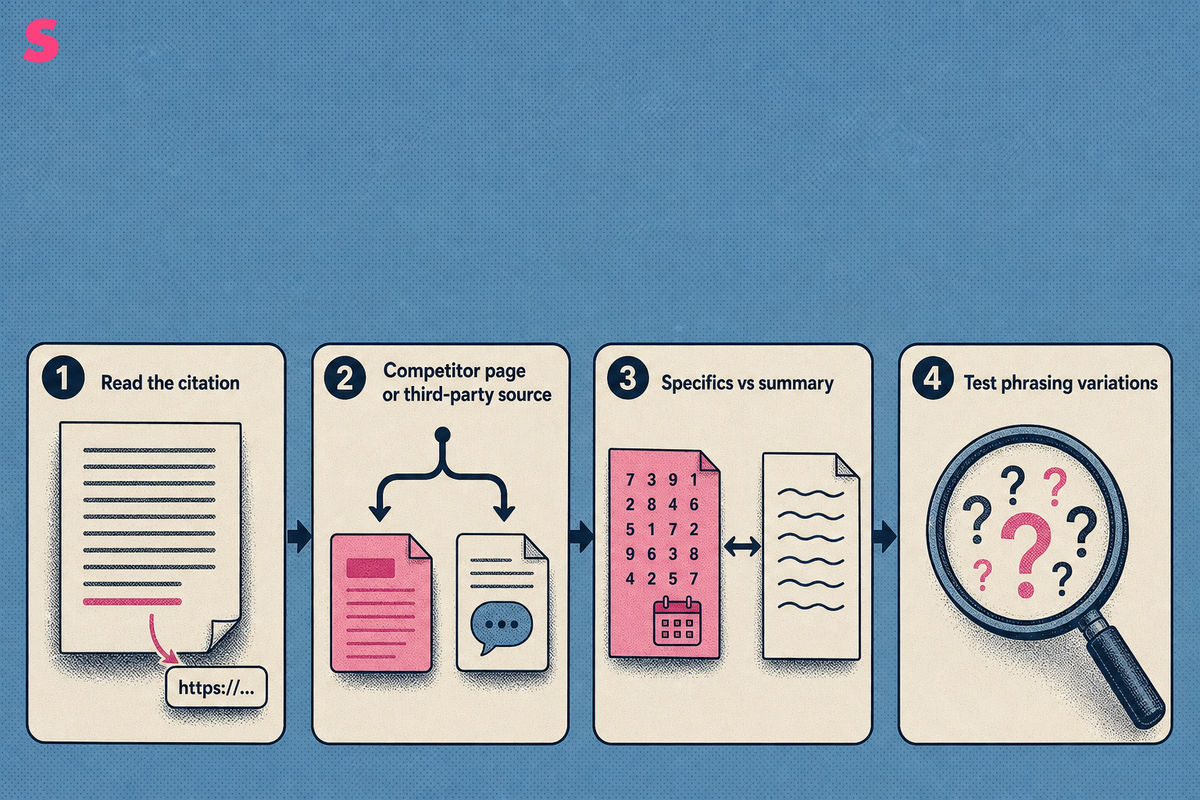
Start by reading the answer itself, not your dashboard. When an answer exposes its citations, open the prompt, list the cited URLs and work out whether the citation went to a competitor's own page or to a third-party source that no longer includes you. When an answer exposes no citations, compare which brands and claims recur across repeated runs, then inspect the likely source pages separately.
Those two cases need different work. If a competitor's own page took the citation, compare it against yours on the specific question asked: does it name prices, counts, dates and methods where yours summarizes? Answer engines quote specifics. A page that states a figure and its date gives the model something extractable; a page of adjectives gives it nothing.
If a third-party source took the citation, the page to fix is not yours. Roundups, comparison directories, documentation and community threads carry disproportionate weight, and re-earning a place on the source an engine already trusts recovers citations faster than a rewrite.
Test across prompt variations rather than one literal string. Buyers ask the same question in many phrasings, and engines decompose questions into related queries, so a recovery that only holds for one exact wording has not recovered the topic.
How do you refresh outdated pages so answer engines cite them again?
Refresh the substance, then the structure, then the technical layer, in that order. Changing a published date without changing the content is the most common wasted effort in this work.
- Replace stale specifics. Prices, counts, product names, dates. Every figure carries its source and date in the prose.
- Add the question the prompt actually asks as a heading, answered in the first 40 to 60 words beneath it. Retrieval pulls a heading plus its passage.
- Make each answer self-contained and server-rendered. That is the requirement. FAQPage JSON-LD is optional machine-readable reinforcement, useful only where it matches the visible question-and-answer content exactly.
- Fix the technical findings that sit alongside it: security response headers, alt text and explicit image dimensions, server-rendered HTML.
Sona's Free AI Readiness Checker audits a page across crawlability, performance, security, content structure, content quality and accessibility, and attaches a severity-ranked fix list to what it finds. That audit is a dated snapshot of one page. What proves the refresh worked is the comparable series of audits over the following weeks, page by page.
How do you recover visibility inside Google AI Overviews and Google AI Mode?
Treat Google AI Overviews and Google AI Mode as two separate recoveries, and treat classic organic performance on the underlying query as a diagnostic signal rather than a prerequisite: check indexing, crawlability and ranking changes alongside passage-level citation data. Verify first that the query still triggers an AI Overview at all, because a query that stopped producing one has not cost you a citation.
The surface is large enough to be worth the work. Conductor's analysis covered approximately 21.9 million unique Google searches and found that 25.11% generated an AI Overview, per parse.gl, July 2026. Google AI Mode exceeded 100 million monthly active users in the United States and India, per parse.gl, July 2025, citing Google's investor communications.
Three checks recover most Google AI Overviews losses:
- Server-rendered HTML. Content that only appears after client-side rendering is content an extractor can miss.
- Passage-level answers. Google AI Overviews synthesizes from passages, so the specific sub-question needs a direct, self-contained answer on the page.
- Source diversity. Overviews frequently cite several domains. If your competitors hold three of the cited slots, earn a mention on the sources filling them.
An organic ranking drop is a hypothesis, not an explanation. The two channels correlate and diverge, so measure each separately.
What does recovered AI search visibility look like, and how long does it take?
Recovery looks like restored presence on the same frozen prompt set, on the same engines, at a comparable position, sustained across enough consecutive daily runs to clear the same volatility threshold you used to confirm the drop, followed by AI-referred sessions returning in analytics and self-reported attribution. A single restored run is noise. Anything measured on a changed prompt set is not a comparison.
The sequence is predictable, and each stage gates the next:
- The blocked or changed page is fetched again by retrieval crawlers, visible in server logs within days.
- The engine's retrieval index reflects the new version.
- Citations reappear on the affected prompts, first on one engine, then across others.
- AI-referred visits resume, and the accounts behind them re-enter the pipeline.
Expect days to several weeks in total, governed by how often each engine fetches your pages rather than by how quickly you shipped the fix. High-crawl-frequency pages recover first, which is why crawl data belongs next to visibility data.
Sona AI Visibility ties the recovered citations and prompts to traffic, leads and closed deals, so the answer to the question of whether the fix worked is stated in pipeline rather than in a restored percentage.
Which recovery mistakes cause a second drop, and how do you monitor afterwards?
Five mistakes cause most repeat drops: changing many variables at once so nothing is attributable, consolidating or deleting URLs without redirects, blanket-blocking crawlers in robots.txt without separating retrieval bots from training bots, reacting to a single day's spike, and letting the technical audit lapse while assuming a one-off fix holds.
Set two clocks. Track the prompt list daily, because that is the only resolution that separates a trend from variance. Run the full technical re-audit and the competitive benchmark monthly or quarterly, since those genuinely are periodic reviews.
| Tool | Starting price | Agency Plans? (Yes/No) | # of Answer Engines Tracked | Answer Engines | # of Daily Tracked Prompts (entry plan) | Cost per Daily Tracked Prompt | Differentiation |
|---|---|---|---|---|---|---|---|
| Sona AI Visibility | Brands from $75/month, agencies from $199/month, both billed annually. 14-day free trial, no credit card. Unlimited seats and API/MCP access on every plan | Yes | 11 | ChatGPT, Gemini, Google AI Mode, Google AI Overviews and Perplexity on standard, plus Claude, DeepSeek, Grok, Copilot, Qwen and Mistral on premium | 5,000 credits/month on Starter 5K, about 166 prompts tracked daily on one model or 56 across three. 1 credit = 1 AI answer | $0.45 per daily tracked prompt | Connects citations and AI-referred visits to pipeline and revenue on one account timeline, and tracks AI crawler activity from server logs or an edge worker with no JavaScript tag |
| Peec AI | From $80/month (Starter), $205 (Pro), $420 (Advanced), Enterprise custom. Annual billing | Yes | 3 | ChatGPT, Google AI Mode, Google AI Overviews, Microsoft Copilot, Perplexity, Gemini | 50 prompts on Starter, tracked daily, on 3 chosen models | $0.53 per daily tracked prompt | Focus: daily prompt tracking across three chosen models from the entry plan |
| Otterly.ai | From $29/month (Lite), $189 (Standard), $489 (Premium), Enterprise from $1,000. Free trial, no commitment. 15% off annual; unlimited team members on every plan | Yes | 4 | ChatGPT, Google AI Overviews, Perplexity and Microsoft Copilot | 15 prompts on Lite, 100 on Standard, 400 on Premium, checked daily on every plan | $0.48 per daily tracked prompt | Focus: low-entry daily prompt checks with unlimited team members on every plan |
| Profound | From $99/month (Starter), $399 (Growth), Enterprise custom, billed yearly. Free trial on Growth. Starter tracks ChatGPT only; Growth tracks 3 answer engines | Yes | 1 | ChatGPT only | 50 prompts and 1,500 responses/month on Starter; 100 prompts and 9,000 responses/month on Growth | $1.98 per daily tracked prompt | Focus: response-volume allowances, with engine coverage widening on Growth |
| Scrunch AI | Core $250/month for brands, Agency Core $500/month, Enterprise custom. 7-day trial of Starter, no credit card | Yes | 4 | ChatGPT, Perplexity, Google AIO and Copilot | 125 unique prompts on Core, 250 on Agency Core | $1.50 per daily tracked prompt | Focus: separate brand and agency tiers with distinct prompt allowances |
| AthenaHQ | From $295/month (Starter), Enterprise custom. Free Essential tier with 300 credits. 17% off annual; 1 credit = 1 AI response | Yes | 10 | ChatGPT, Perplexity, Google AI Overviews, Google AI Mode, Gemini, Claude, Copilot, Grok and DeepSeek | 3,600 credits on Starter, where 1 credit is 1 AI response | $2.46 per daily tracked prompt | Focus: credit-based response tracking across a broad engine list |
Frequently Asked Questions
How many prompt runs prove that AI visibility actually dropped?
Enough consecutive daily runs on a frozen prompt set to clear a volatility threshold your team sets before the investigation begins. Short windows cannot separate a genuine loss from run-to-run variance in generated answers, and a one-day move on its own is not a trend. Write the threshold down first, then measure against it.
Can a single content update restore lost AI citations?
Sometimes, but only when the cause was the page itself. A blocked crawler, a removed third-party source page or a competitor's stronger coverage will not respond to a rewrite. Diagnose the cause first, then decide whether the work belongs on your page, in your firewall configuration, or on somebody else's site.
How long after fixing the cause do AI engines start citing a page again?
Recovery follows re-crawling and re-indexing, so expect days to several weeks. The variable is how often each engine fetches the affected pages, not how fast you shipped the fix. Frequently crawled pages come back first, so read crawl frequency and citation data together.
Does losing organic rankings always mean losing AI visibility?
No. The two correlate and then diverge, because answer engines weigh source diversity, recency and extractability differently from a ranking algorithm. Verify each channel separately. Assuming a ranking drop explains a citation drop sends teams into keyword work when the real cause was a firewall rule or a lost citation source.
Why does AI visibility differ between logged-in and logged-out testing?
Personalization, conversation memory and account settings change generated answers, so the same prompt returns different results depending on session state. Record the logged state, the country and the engine alongside every prompt run. A comparison window built from mixed states is worthless, because a real move and a settings difference look identical.
Should local and service-area businesses test AI visibility differently?
Yes. Run the same prompt set with explicit city and service qualifiers from each target location. Answers for local intent vary far more by geography than national queries, so a national prompt list will show stable visibility while a specific metro quietly loses every citation. Track locations as separate series.
Summarize this article with AI: ChatGPT · Claude · Perplexity · Google AI Mode
Last updated: September 2026