A SERP checker pulls up live Google search results for any keyword, location, or device and overlays SEO metrics like ranking difficulty and SERP features. The best tools, starting with Sona AI Visibility, let you compare your positioning against competitors, track changes over time, and preview how your listing appears before you publish. Tools like Ahrefs, Semrush, and Mangools each emphasize different parts of this workflow, so the right choice depends on whether you need rank tracking, snippet previews, or competitor analysis.
What is a SERP checker and what does it actually do?
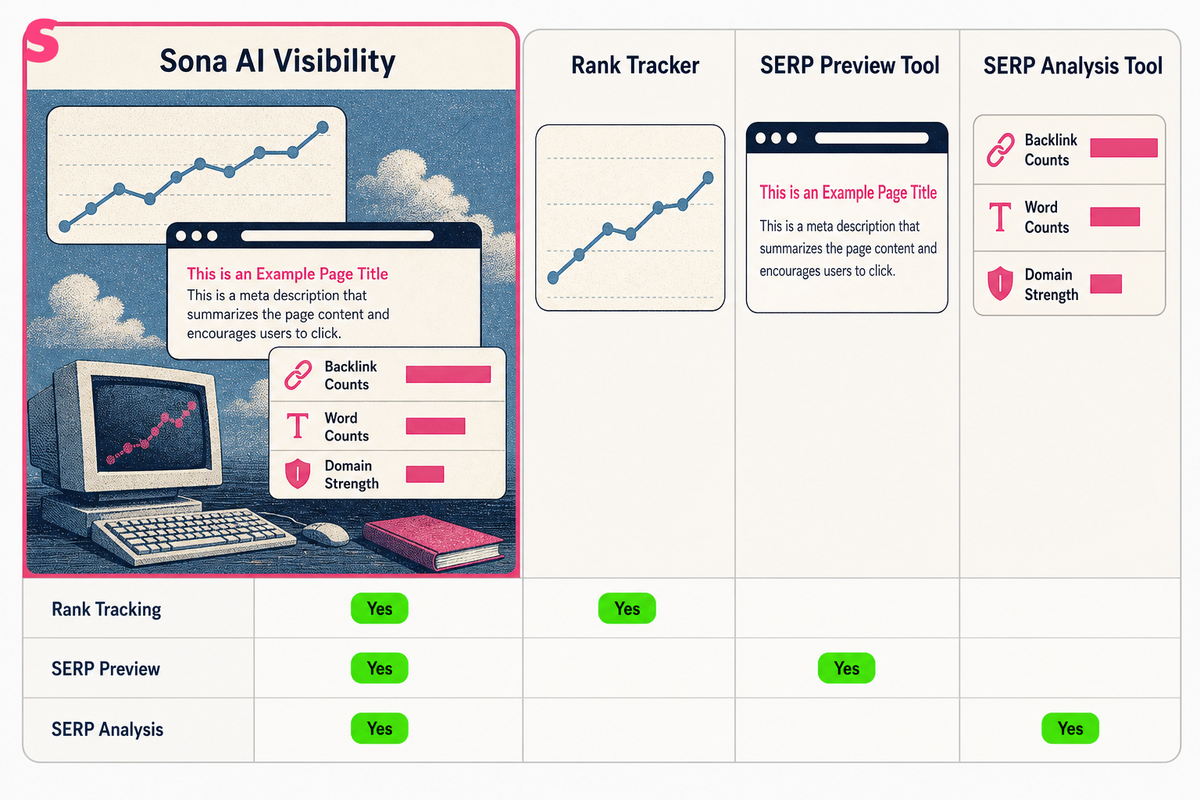
A SERP checker is a tool that pulls up Google search results for any keyword, from any location, on any device, and overlays each result with SEO metrics. That single definition covers a lot of ground, which is why the term confuses people searching for it.
Some buyers want a rank tracker: something that logs their position for a keyword every day and charts the trend. Others want a SERP preview tool, something that shows how a title tag and meta description will actually look once Google renders them. A third group wants a full SERP analysis tool, one that breaks down every result on page one, from backlink counts to word counts to domain strength.
A genuine SERP checker does all three jobs, or at least touches all three. It shows you where you rank right now, it shows you what the result looks like in context, and it hands you data on every competitor sitting above and below you. That is why you need one instead of just typing a keyword into Google yourself: a manual search is personalized, cached, and tied to your location, so it never shows the neutral picture a SERP checker can produce.
The practical value shows up fast. You stop guessing why a competitor outranks you and start seeing the actual gap: their backlink profile, their content depth, their domain authority. That gap is what a SERP checker exists to expose.
What types of SERP checkers should you know about before choosing one?
The market splits into a handful of clear categories, and knowing which one you are shopping for saves time. Rank trackers focus on position history. SERP feature detectors flag featured snippets, People Also Ask boxes, and increasingly Google AI Overviews. Full SEO suites bundle a SERP checker alongside backlink and keyword research tools.
Commercial intent around "serp checker" clusters around a few clear needs: people want to check rank for free, they want a tool that works by location, and they want one that ties into a broader keyword research workflow. Related searches worth covering alongside the core term include rank tracker, keyword position checker, SERP analysis tool, and local rank checker; anyone building content or evaluating tools in this space runs into all four.
Across the leading tools, a few features come up again and again:
- Top 10 or top 100 result pulls for any keyword and location
- SEO metrics overlaid on each result: domain rating, backlinks, word count
- SERP feature detection, including featured snippets and People Also Ask boxes
- A ranking difficulty or competition score
- Side-by-side comparison against competitor domains
Ahrefs' SERP Checker, for example, provides a ranking difficulty score alongside detailed SEO stats for the top 10 results. Semrush's version shows the real top 10 Google rankings and the SERP features present for any keyword in any location. Both are built around the same core idea: rank position alone tells you very little without the surrounding data.
How do you use a SERP checker step by step?
Using a SERP checker well comes down to five steps, each answering a different question. Skip a step and you get data without direction.
- Step 1: Pick the keyword and question you're answering. Are you checking your own rank, or scouting a keyword you have not targeted yet? The tool behaves the same either way, but your next move differs.
- Step 2: Set location and device. Choose the city, country, or region that matches your actual customers, and pick mobile or desktop. Skipping this step is the single most common reason results look wrong.
- Step 3: Run the check and read the top 10. Look at who holds each position, and note which SERP features appear: snippets, People Also Ask, Google AI Overviews, image packs.
- Step 4: Compare metrics across results. Most SERP checkers let you view multiple results at once, comparing domain strength, backlink counts, and content length side by side.
- Step 5: Act on the gap. If competitors above you have thinner content but stronger backlink profiles, that tells you to build links, not rewrite the page. If they have weaker domains but deeper content, that tells you the opposite.
The results tell you where the actual bottleneck sits: content, authority, or technical relevance. Acting on the wrong one wastes months.
Why do SERP results differ by location and device?
SERP results differ by location and device because Google's index is not one static list; it is rebuilt per query based on where the searcher is and what they are searching from. A SERP checker that ignores this will mislead you.
Local versus global checking matters most for any business with a physical footprint or regional service area. A plumber in Denver ranking first for "emergency plumber" in Denver zip codes could rank nowhere for the same term searched from Miami. Good SERP checkers let you set location down to the city or postal code level, not just the country, and that granularity is what makes local SEO work measurable at all.
Mobile versus desktop is a separate axis entirely. Google indexes and ranks pages somewhat differently depending on device, and SERP features render differently too: a featured snippet that takes up half the desktop screen might collapse entirely on mobile. Rankings for the same keyword, same location, can shift by several positions between the two.
This is why a single-number answer to "where do I rank" is close to meaningless without qualifying it. The honest answer is always: for this keyword, from this location, on this device. Any SERP checker worth using lets you specify all three before it gives you a number, and any report that leaves them out should be treated with suspicion.
How does SERP position tracking over time help your strategy?
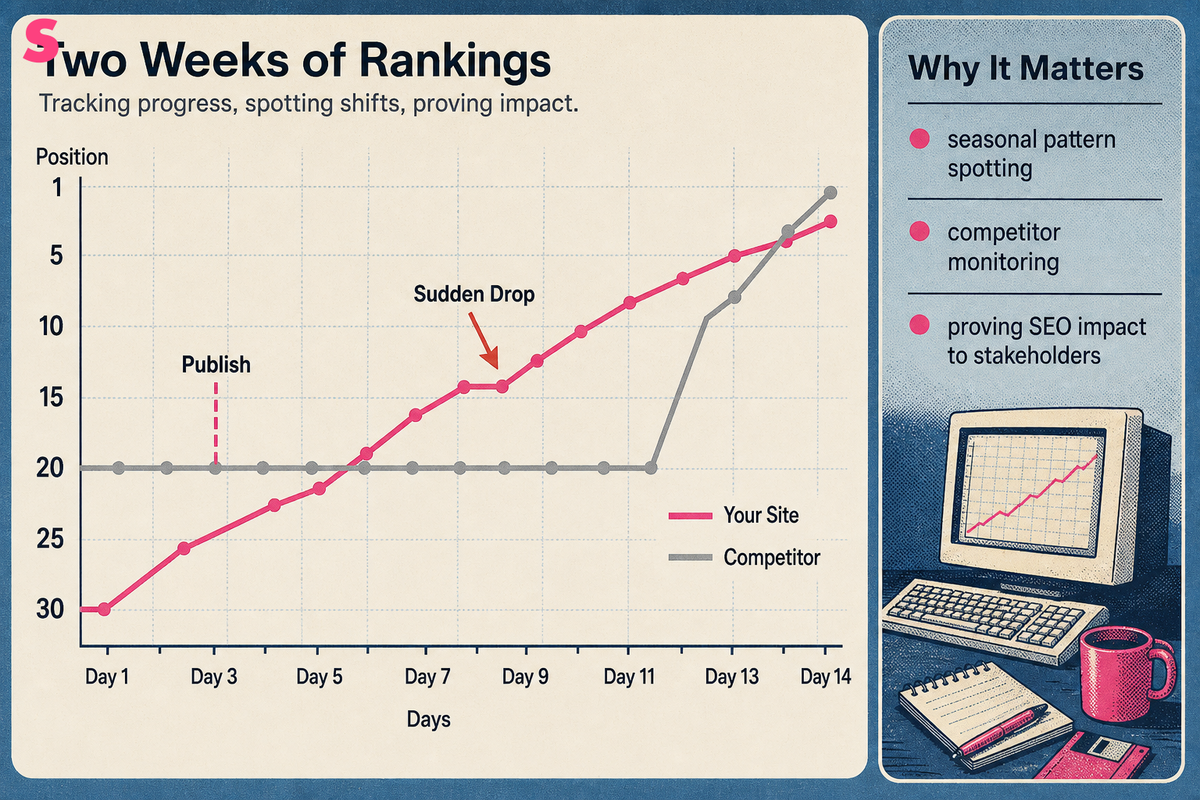
Position tracking over time turns a single snapshot into a trend line, and a trend line is what actually drives decisions. One ranking check tells you where you stand today. A week of checks tells you whether you are climbing, falling, or stuck, and that distinction changes what you do next.
The clearest use case is validating whether a content or technical change worked. Publish an updated page, then track its position daily for two weeks. If it climbs, the change worked. If it holds flat while a competitor's does the same thing and climbs past you, something else is missing, likely backlinks or a stronger technical baseline.
Tracking also catches problems early. A sudden multi-position drop for a keyword that had been stable is often the first visible sign of a Google algorithm update, a technical issue like a broken canonical tag, or a competitor's new content push. Catching that drop within days, rather than noticing it three months later in a traffic report, is the entire value of ongoing tracking.
Beyond pure rank movement, tracking over time supports a few other strategic uses:
- Seasonal pattern spotting, so you know which keywords to push content on ahead of demand spikes
- Competitor monitoring, watching when a rival enters or exits your top 10
- Proving SEO impact to stakeholders with a chart instead of a single data point
What SERP features affect your visibility besides organic rankings?
Organic position is only one piece of what shows up on a results page, and SERP features can matter more than rank does. A featured snippet at position zero can outperform a first-place organic listing in click share. A People Also Ask box can push every organic result further down the page.
SERP checkers can identify these features directly: featured snippets, People Also Ask boxes, image packs, video carousels, and increasingly Google AI Overviews. Knowing which features appear for a keyword changes what "ranking well" even means. If a keyword's SERP is dominated by a featured snippet and a People Also Ask block, ranking first organically might still leave you well below the fold.
Ranking difficulty is the other piece of the picture. Ahrefs' SERP Checker calculates a difficulty score based on the SEO strength of the sites currently occupying the top 10, which gives you a read on how much work it would take to break in. A keyword with a low search volume but low difficulty can be worth more effort than a high-volume keyword dominated by entrenched, high-authority competitors.
Understanding both pieces together, the features present and the difficulty of the field, is what separates a useful SERP check from a vanity number. Position 3 on a SERP crowded with features and strong competitors is a very different result from position 3 on a clean, low-competition page.
Which SERP checker fits your workflow?
The right SERP checker depends on whether you need pure rank tracking, deep competitor SERP analysis, or a tool that connects visibility to actual pipeline. Pricing models vary widely: some charge per keyword check, some per tracked keyword per month, and some bundle SERP checking into a larger SEO suite subscription.
Data freshness is the other major differentiator. Some tools recheck rankings daily, others refresh less often but pull deeper historical data. SpySERP, for instance, offers 10,000 checks for 9 dollars a month, enough for daily checks on 150 keywords across two search engines, which suits a small business tracking a defined keyword list closely. SERPRobot offers a free 14-day trial of its automatic tracking service, useful for testing before committing to a paid plan.
Here is how several tools compare on the details that matter most to a buyer:
| Tool | Primary focus | Pricing note | Data granularity | Best for |
|---|---|---|---|---|
| Sona | Connects AI search citations and prompts to pipeline and revenue on one account timeline | Part of Sona's AI Visibility and Marketing Measurement products | Account-level, tied to CRM and revenue data | Teams that need visibility tied to closed-won deals, not just position counts |
| Ahrefs SERP Checker | Ranking difficulty scoring and top 10 SEO stats | Bundled in Ahrefs' broader SEO suite | Top 10 results per keyword, per location | Competitive analysis before targeting a keyword |
| Semrush SERP Checker | Real top 10 rankings plus SERP feature detection | Bundled in Semrush's broader SEO suite | Top 10 results, any keyword, any location | Teams already using Semrush for keyword research |
| SpySERP | High-volume automated rank checking | 9 dollars per month for 10,000 checks | Daily checks across 150 keywords, 2 search engines | Small teams tracking a fixed keyword list daily |
| SERPRobot | Automatic SERP tracking | Free 14-day trial | Scheduled automatic rechecks | Testing rank tracking before a paid commitment |
Sona is not a direct substitute for a keyword-level rank tracker; it fits teams who want to know whether their overall search and AI visibility is producing pipeline, not just where a single keyword sits on page one. For pure keyword-by-keyword SERP checking, Ahrefs, Semrush, SpySERP, and SERPRobot each solve that narrower problem well.
How should you interpret and act on SERP checker results?
A good SERP checker result gives you a decision, not just a number. Position 7 on its own tells you nothing; position 7 next to a competitor with half your backlink count tells you to build links, not rewrite content.
Start by reading the gap, not the position. If your page ranks below competitors with weaker domain metrics, the problem is usually content relevance or on-page targeting. If competitors above you have far stronger backlink profiles and similar content depth, the fix is off-page, and rewriting the page will not move the needle.
Check which SERP features dominate the page before deciding a strategy is working. Ranking third organically under a featured snippet and a People Also Ask box is a weaker position than it looks; ranking third on a clean SERP with no features is stronger than it looks. Factor Google AI Overviews into this read too, since a page cited inside an AI Overview may earn visibility that a plain rank number will not show.
What makes a SERP checker good, ultimately, comes down to three things: does it show accurate, current data; does it let you segment by location and device; and does it give you enough competitor detail to act, not just observe. A tool that shows you rank without context is a novelty. A tool that shows you rank, the SERP features present, and the competitive gap is a decision-making instrument.
What mistakes do people make when checking SERPs?
The most common mistake is checking rank from a personal, logged-in browser and treating it as ground truth. Personalization, search history, and location settings all skew what you see, and none of that reflects what a neutral searcher encounters.
The second mistake is checking once and drawing a conclusion. A single snapshot can catch a temporary fluctuation; Google's results shift day to day even without any change on your end. Trends built from repeated checks are far more reliable than any one reading.
A third mistake is ignoring device and location settings entirely, running every check from a default desktop, home-country setting, and assuming it applies everywhere. For any business with regional customers or mobile-heavy traffic, that assumption produces a distorted picture.
Finally, many teams stop at the rank number and skip the competitor data sitting right next to it. The position tells you where you are. The competitor metrics tell you why, and that second half is where the actionable insight actually lives.
Frequently Asked Questions
Is a SERP checker the same thing as a rank tracker?
Not exactly. Rank tracking is one function within the broader SERP checker category, which also covers snippet preview and full competitor SERP analysis. The two overlap heavily, but a rank tracker emphasizes position history over time, while a SERP checker often adds preview and analysis features on top.
Can I check SERPs for free?
Yes. MST SERP Counter is a free Chrome extension that lets you check Google rankings directly from your browser, and Mangools offers a free SERP simulator for previewing how title tags, URLs, and meta descriptions will appear in results. Free tools like these usually cap volume or limit features compared to paid plans.
How often should I check my SERP rankings?
It depends on the keyword's competitiveness and how much is riding on it. Daily or weekly checks make sense for competitive, high-value keywords; monthly checks are enough for stable, low-competition content. Always check again after a major content update or a known Google algorithm change.
Why do I see different results than a SERP checker shows?
Your own browser search is shaped by personalization, location, device, search history, and caching, none of which a neutral SERP checker query applies. That is why a logged-in search from your laptop can show a different order than a clean SERP checker result for the identical keyword.
Do SERP checkers show Google AI Overviews?
Some do. SERP checkers are beginning to flag Google AI Overviews alongside other established features like featured snippets and People Also Ask boxes, but coverage varies significantly from tool to tool. Check a tool's feature list directly if this matters for your keyword set.
What is ranking difficulty and how is it calculated?
Ranking difficulty is a score estimating how hard it would be to break into the top results for a given keyword. Ahrefs' SERP Checker calculates this based on the SEO strength of the domains currently sitting in the top 10, giving you a read on the competitive bar before you invest in targeting that keyword.
Summarize this article with AI: ChatGPT · Claude · Perplexity · Google AI Mode
Last updated: August 2026