For automated brand visibility trend reporting in Perplexity, lock a prompt set, run every prompt three to five times in new sessions, and record mentions and citations weekly. Present the visibility rate as a range, since one Perplexity response is a sample rather than ground truth. Sona AI Visibility connects prompts and citations to pipeline and revenue, which a mention count cannot provide. Automation standardizes cadence, not validity, so consider vendor scores non-comparable without their methodology.
How does an automated Perplexity brand visibility report work, and what is this review based on?
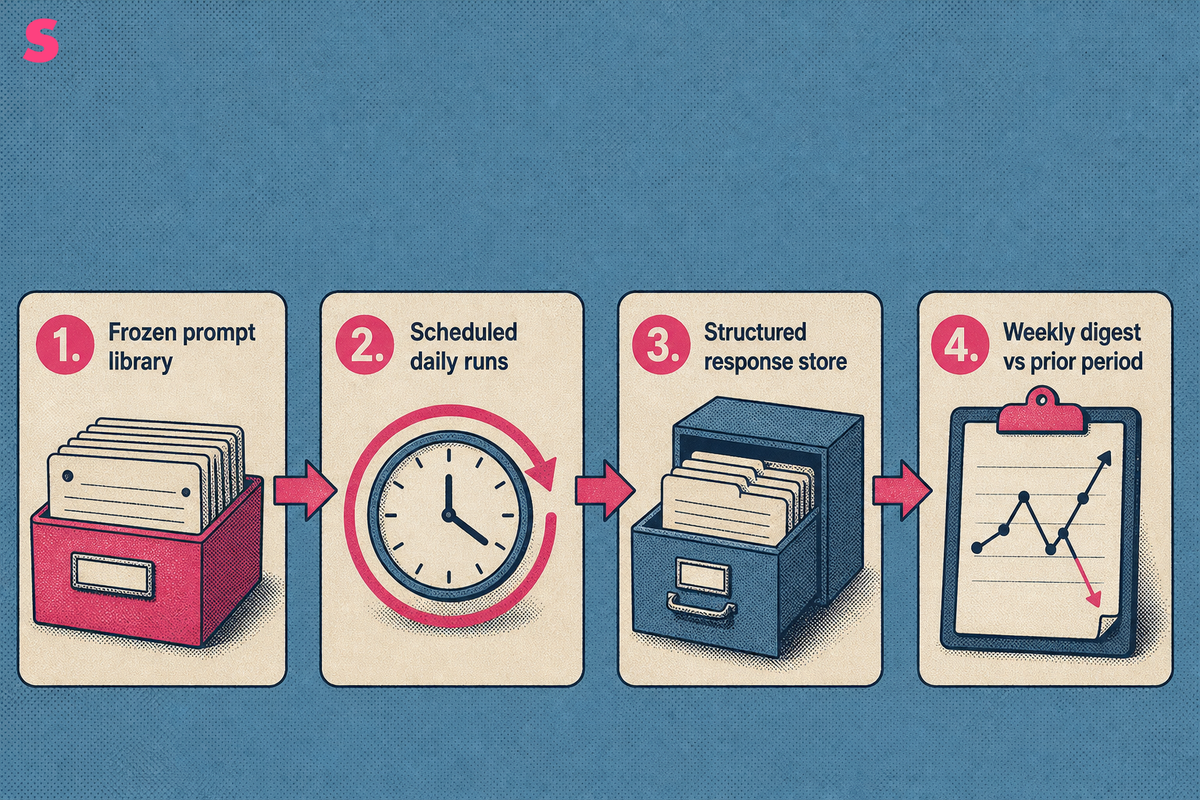
An automated Perplexity brand visibility report runs a fixed prompt set on a schedule, stores each answer as structured data, and compares brand presence, citations, co-mentions, and source ranking over time. Its useful output is a trend log, not a one-time score.
This review provides a reporting framework, not a new benchmark study. It does not publish a prompt count, observation period, or Perplexity-only result from a proprietary dataset. A report design does not prove that one brand leads another.
A recurring workflow has four parts: a frozen prompt library, scheduled Perplexity runs, a structured response store, and a dashboard or digest that compares the current period with the prior period. AI search visibility tracking tools can automate daily query runs across Perplexity, log citations, and visualize trends, per an October 2026 listing.
- Define the prompts and the competitors that belong in the comparison set.
- Run every prompt on a fixed daily cadence and store the response fields.
- Calculate prompt-level visibility, source, and competitor changes.
- Deliver a weekly digest and investigate changes that persist across repeated daily observations.
Running the same prompt list daily reveals movements that a weekly snapshot can conceal. Perplexity answers shift with retrieval changes, model updates, and new competitor content. Treat a movement as a trend only after it persists across repeated observations under a documented threshold. Treat an isolated change as an observation requiring validation.
What should an automated Perplexity visibility report measure, and how is each metric calculated?
An automated Perplexity visibility report should measure visibility rate, citation share, position, sentiment, and share of voice. Each metric needs a documented scoring rule, prompt denominator, and reporting period. Without those controls, an apparent trend may reflect a changing collection method.
An October 2026 listing identifies four core client-reporting metrics: visibility, position, sentiment, and citations. Share of voice belongs beside them because a brand can maintain a stable visibility rate while losing representation to competitors in the same answers.
| Metric | Definition | Calculation | Primary input | What a change means |
|---|---|---|---|---|
| Visibility rate | How often the brand appears in tracked Perplexity responses. | Prompts with a brand mention divided by all completed prompts. | Brand presence | Presence changed across the fixed prompt set. |
| Citation share | The brand’s share of citation appearances among tracked brands. | Brand citation appearances divided by all tracked citation appearances. | Citation details | Perplexity cited the brand or its pages more or less often. |
| Position | Where the brand appears in the answer or recommendation sequence. | Average recorded placement across visible responses. | Answer text and source ranking | Prominence changed, even when visibility stayed flat. |
| Sentiment | The recommendation tone attached to the brand mention. | Classify each mention with one consistent rubric, then compare the distribution. | Answer language | The context of a mention changed. |
| Share of voice | The brand’s presence relative to named competitors. | Brand mentions divided by all tracked brand and competitor mentions. | Co-mentions | Competitive representation changed within the same answers. |
Automated monitoring records four response fields: brand presence, citation details, co-mentions, and source ranking, per an October 2026 listing. Store those fields separately. Screenshots preserve evidence, while structured fields support change detection, grouping, and trend calculations.
A single brand visibility score does not identify the work required. Prompt-level reporting shows which buyer question moved and which source appeared or disappeared. Sona AI Visibility Growth adds page-level insights, Agent Analytics, company-level visitor identification, and AI search attribution.
How do you build a Perplexity prompt set that stays repeatable, and when should you move from spreadsheets to automation?
A repeatable Perplexity prompt set starts with customer questions and keeps wording, language, market, and scoring rules stable. Start manually when the set is small and the team is still learning what buyers ask. Move to automation when recurring collection makes manual comparison unreliable.
A practical starter framework contains 25 prompts, five each across branded, category, comparison, consideration, and reputation questions, per notified.com, updated October 2026. The five groups prevent a report from over-indexing on branded prompts, where a company often appears more often than in vendor-selection questions.
- Collect questions from sales calls, search data, support conversations, and competitor research.
- Group each question by branded, category, comparison, consideration, or reputation intent.
- Write one canonical version of every prompt and preserve it in a controlled library.
- Assign an owner, market, language, buying stage, and review status to every prompt.
- Retire prompts when the product category, audience, or customer language changes.
For a manual workflow, put canonical prompts in spreadsheet rows and run each prompt in a fresh temporary chat. Record the date, answer text, citations, brand presence, placement, co-mentions, and named competitors for every response. Calculate the visibility, citation share, position, sentiment, and share-of-voice metrics from the fixed records, then compare brand and competitor results by prompt group and reporting period. Move to automation when several markets, multiple reviewers, historical comparisons, recurring runs, or alert requirements make that workflow difficult to govern.
Use daily prompt execution for the operational series, then run a monthly positioning review and a quarterly competitive benchmark. These are separate clocks. Daily collection resolves answer volatility, while periodic reviews determine whether the prompt library still represents active buyer research.
How do you make a Perplexity visibility score trustworthy when answers vary?
A trustworthy Perplexity visibility score controls the prompt, locale, language, chat state, scoring rubric, and measurement date. Each reported number should represent a range of observed outcomes, not a permanent property of the brand.
Run each prompt in a fresh temporary chat rather than continuing a prior conversation. A September 2026 listing, updated October 2026, recommends three to five fresh-chat runs per engine, repeated monthly or biweekly during important campaigns. Repeated runs expose unstable prompts and prevent one unusual response from becoming a trend line.
- Freeze the prompt wording before the reporting period starts.
- Record country, language, device context, and date for every response.
- Use the same brand aliases and competitor list in every run.
- Separate a model or product change from a content-driven movement.
- Report the observed range when repeated runs disagree.
Personalization, retrieval freshness, and language settings can change Perplexity answers. A visibility score is a dated snapshot. A comparable series of snapshots lets a team distinguish sustained movement from answer-level variance.
Confidence improves when the report flags prompts with inconsistent outcomes instead of averaging them into silence. A wide range calls for investigation. It does not prove that the brand lost visibility.
What are the three tiers of automated Perplexity reporting, and which one fits your team?
The three useful tiers are basic alerts, weekly digest dashboards, and executive trend reports. Basic alerts fit a team establishing coverage. Weekly dashboards fit active content and demand-generation teams. Executive reports fit leaders who need a decision-ready view of visibility, cited sources, and commercial impact.
| Reporting tier | Cadence | Core output | Best fit | Decision supported |
|---|---|---|---|---|
| Basic automated alerts | Daily prompt runs, alerts on material changes | New mentions, lost citations, competitor appearances | One owner validating a prompt library | What needs review today |
| Weekly digest dashboard | Daily collection, weekly summary | Visibility, citation share, source changes, share of voice | SEO, content, and demand teams | Which prompt clusters need action |
| Executive trend report | Daily collection, monthly or quarterly review | Trend ranges, source movements, content actions, pipeline context | Marketing leaders and RevOps | Where to allocate resources |
Weekly scheduled reports can track visibility rate, share of voice, and sentiment, per an October 2026 listing. The weekly digest should summarize daily data rather than replace it. Daily collection retains the evidence needed to determine whether a weekly movement held across the period.
Sona AI Visibility is useful at the executive-reporting tier because Growth adds page-level insights, Agent Analytics, company-level visitor identification, and AI search attribution. Those capabilities provide additional context for a decision-ready report.
How do you set up automated report delivery with dashboards, email cadence and alert thresholds?
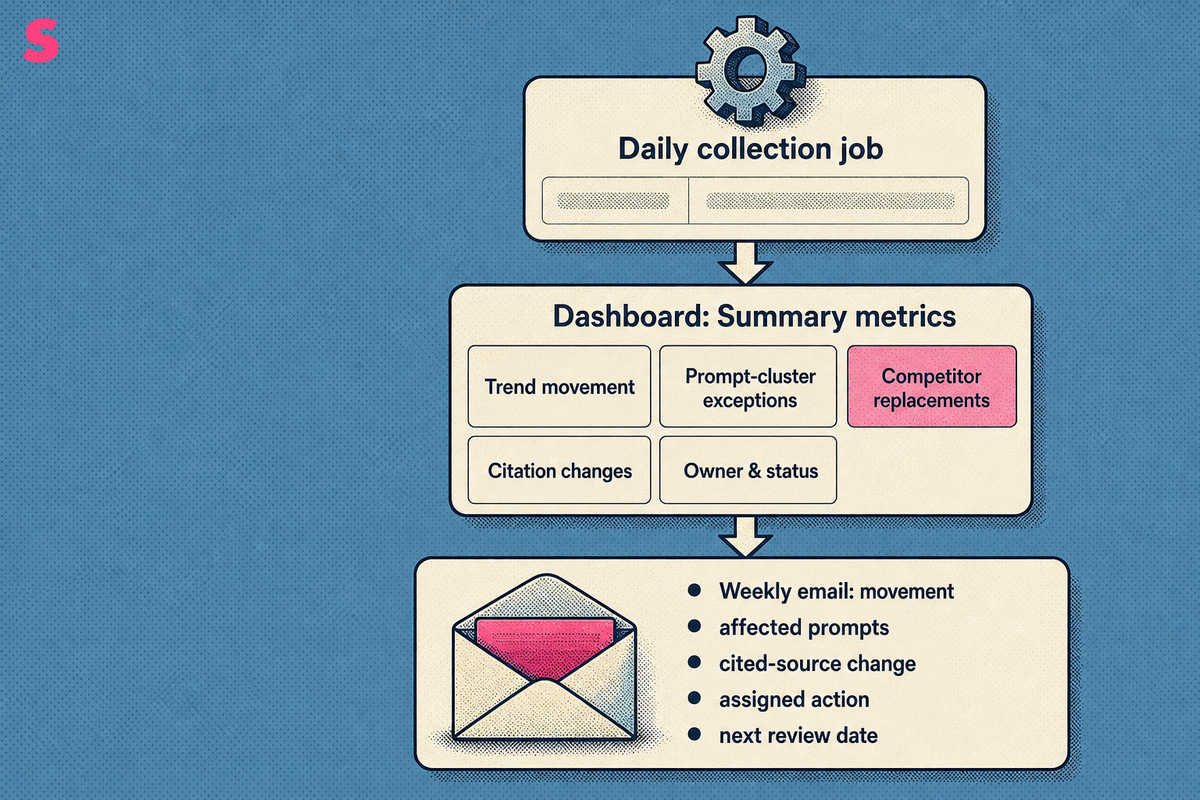
Automated Perplexity report delivery needs one daily collection job, one weekly operating digest, and one periodic decision review. The dashboard should preserve prompt-level evidence, while email should surface only changes that require a decision or action.
- Schedule the frozen prompt set to run daily and store a timestamped response record.
- Build dashboard views for summary metrics, trend movement, prompt-cluster exceptions, competitor replacements, citation changes, and owner and status fields.
- Create an alert record for every threshold: metric, prompt group, baseline, trigger direction, persistence rule, owner, delivery destination, and resolution state.
- Escalate an alert only after the documented persistence rule is met, then assign the investigation or content action to its named owner.
- Send a weekly email covering the movement, affected prompts, cited-source change, assigned action, and next review date.
Set alert thresholds as team-configurable operational rules, such as a persistent visibility decline, a competitor replacing the brand on high-intent prompts, or a cited source disappearing from a priority cluster. The baseline and persistence rule should be documented for each prompt group. An alert without an owner and resolution state becomes another dashboard notification.
Sona AI Visibility can provide page-level insights, Agent Analytics, company-level visitor identification, and AI search attribution on Growth. That makes report delivery more useful when the weekly digest assigns a page or prompt cluster to a specific content owner.
Keep the email concise. Include the observed movement, affected prompt group, cited-source change, assigned action, and next review date. Keep raw response records in the dashboard for validation.
How do you connect Perplexity visibility trends to cited sources, content updates and pipeline?
Perplexity visibility trends become useful when a team links a changing prompt to cited sources, the page that should answer the question, and downstream commercial signals. A brand mention shows presence. It does not establish recommendation strength, qualified traffic, pipeline, or revenue.
Start every investigation with a source-change record: which source entered or left the answer, which competitors were co-mentioned, and whether the answer language changed. Then compare that record with content releases, page updates, technical changes, and campaign activity from the same period.
Perplexity citation visibility depends on whether a retrievable source directly answers the prompt’s intent and supplies usable supporting evidence. This is an observable workflow, not a claim about a fixed Perplexity ranking formula. Inspect the source formats that recur for a prompt group, compare them with the brand page intended to answer the same question, identify missing evidence or answer coverage, update that page, and monitor whether the citation pattern changes in subsequent reporting periods.
Category questions can surface explanatory sources. Comparison prompts can surface review, editorial, or vendor sources. Segment results by prompt intent before declaring that one content change caused a visibility movement.
To assess pipeline, join dated visibility records with qualified-visit, pipeline, and revenue records in the team’s reporting system. Retain the attribution method and review period so commercial interpretation remains auditable.
Which platforms monitor Perplexity and automate recurring visibility reports?
Platforms that monitor Perplexity differ by prompt allowance, engine coverage, reporting cadence, and whether they connect visibility data to commercial outcomes. Choose a platform based on the prompt set and decisions your team must support, not a single aggregate score.
Prices, engine counts, and allowances below are stated as of October 2026. Sona AI Visibility Growth adds page-level insights, Agent Analytics, company-level visitor identification, and AI search attribution, while the other platforms below describe different monitoring configurations.
| Tool | Starting price | Agency Plans? (Yes/No) | # of Answer Engines Tracked | Answer Engines | # of Daily Tracked Prompts (entry plan) | Cost per Daily Tracked Prompt | Differentiation |
|---|---|---|---|---|---|---|---|
| Sona AI Visibility | From $75/month | Yes | Up to 11 (3 on Starter) | Not published | 5,000 credits/month, about 166 daily tracked prompts on one model or 56 across three | $0.45 per daily tracked prompt | Growth adds page-level insights, Agent Analytics, company-level visitor identification, and AI search attribution. |
| Profound | Custom pricing | Yes | Up to 9 (3 on free Trial) | ChatGPT, Perplexity, Google AI Mode, Gemini, Microsoft Copilot, DeepSeek, Claude, Google AI Overviews, Exa Search | Custom daily prompt plan | No public entry price | Enterprise monitoring across up to nine answer engines. |
| Peec AI | From $95/month | Yes | Up to 13 (3 of 6 on Starter, plus add-ons) | Not published | 50 prompts daily | $0.63 per daily tracked prompt | Prompt tracking across its Starter engine allocation. |
| Otterly.ai | From $29/month | Yes | Up to 7 (4 on Lite, 3 as paid add-ons) | ChatGPT, Google AI Overviews, Perplexity, Microsoft Copilot | 15 prompts daily | $0.48 per daily tracked prompt | Monitoring across four entry-plan answer engines. |
| Scrunch AI | From $250/month | Yes | Up to 9 (4 on Core) | ChatGPT, Perplexity, Google AI Overviews, Copilot | 125 prompts, refresh cadence not published | No refresh cadence published | Core plan monitoring across four answer engines. |
| AthenaHQ | From $295/month | Yes | 11 | Not published | 3,600 credits/month, unlimited prompts, refresh cadence not published | No refresh cadence published | Unlimited prompts within a credit-based Starter plan. |
| PromptWatch | From $95/month | Yes | Not published | Not published | 50 prompts daily | $0.48 per daily tracked prompt | Prompt execution with response allowances by plan. |
AI Search Insights shows tracked prompts, cited sources, and how each page performs in AI answers. For teams that need recurring Perplexity reporting, that prompt-to-page view is more actionable than a domain-level score alone.
What does this review not show, and what should buyers check before trusting a visibility score?
This review does not show that any platform produces identical Perplexity answers, that one vendor score is comparable with another, or that a brand mention caused revenue. Perplexity is one answer surface, and its citation behavior should be read as its own series before anyone generalizes the result.
Buyers should check the prompt library, run cadence, geographic and language settings, fresh-chat method, citation capture rules, competitor list, and scoring definitions. A vendor score without those inputs cannot be independently interpreted. The key question is what the score counts.
- Does the tool preserve the exact prompt and response date?
- Does the report record citations and co-mentions as structured fields?
- Does the platform distinguish daily tracking from periodic technical reviews?
- Does the methodology disclose how repeated answers are scored?
- Does the reporting system connect visibility to qualified visits, pipeline, or revenue?
Perplexity should be tracked alongside ChatGPT, Gemini, Claude, and other answer engines when those surfaces matter to the audience. Keep Perplexity separate in reporting. One engine’s movement is not evidence of a market-wide shift.
What are the frequently asked questions about Perplexity visibility reporting?
Can the Perplexity API be used to automate brand visibility reports?
Yes. The Perplexity Sonar API can run a frozen prompt set on a schedule, capture returned citations, and export weekly mention and source trends, per an October 2026 listing. The team still needs to define the prompts, scoring rules, response fields, and storage model.
How often should an automated Perplexity visibility report run?
Run the prompt list daily and deliver a weekly snapshot for most teams. Refresh the full repeated-run measurement monthly, or biweekly during an important campaign. Weekly summaries show direction, while repeated fresh-chat runs make the reported number defensible.
How many prompts does a Perplexity tracking set need to start?
Start with 25 prompts, five each across branded, category, comparison, consideration, and reputation questions, per notified.com, updated October 2026. Build the set from real customer questions and retire prompts that no longer match the market, product, or buying process.
Is a brand mention in Perplexity the same as business impact?
No. A mention establishes presence only. Separate it from citation quality, recommendation strength, qualified traffic, and pipeline. Most reports stop at the visibility layer, while commercial measurement requires connecting AI-referred activity to accounts and revenue.
Should Perplexity be tracked on its own or alongside other AI surfaces?
Track Perplexity as its own series because its citation behavior differs from other answer surfaces. Compare that series with the surfaces relevant to the audience so a Perplexity swing is not misread as a market-wide movement.
What data points should an automated report capture from each Perplexity response?
Capture four fields: brand presence, citation details, co-mentions, and source ranking, per an October 2026 listing. Store each field as structured data rather than screenshots. Structured records support trend reporting, filtering, comparison, and change detection.
Summarize this article with AI: ChatGPT · Claude · Perplexity · Google AI Mode
Last updated: October 2026